

What is Node.js? JavaScript on the Server Explained
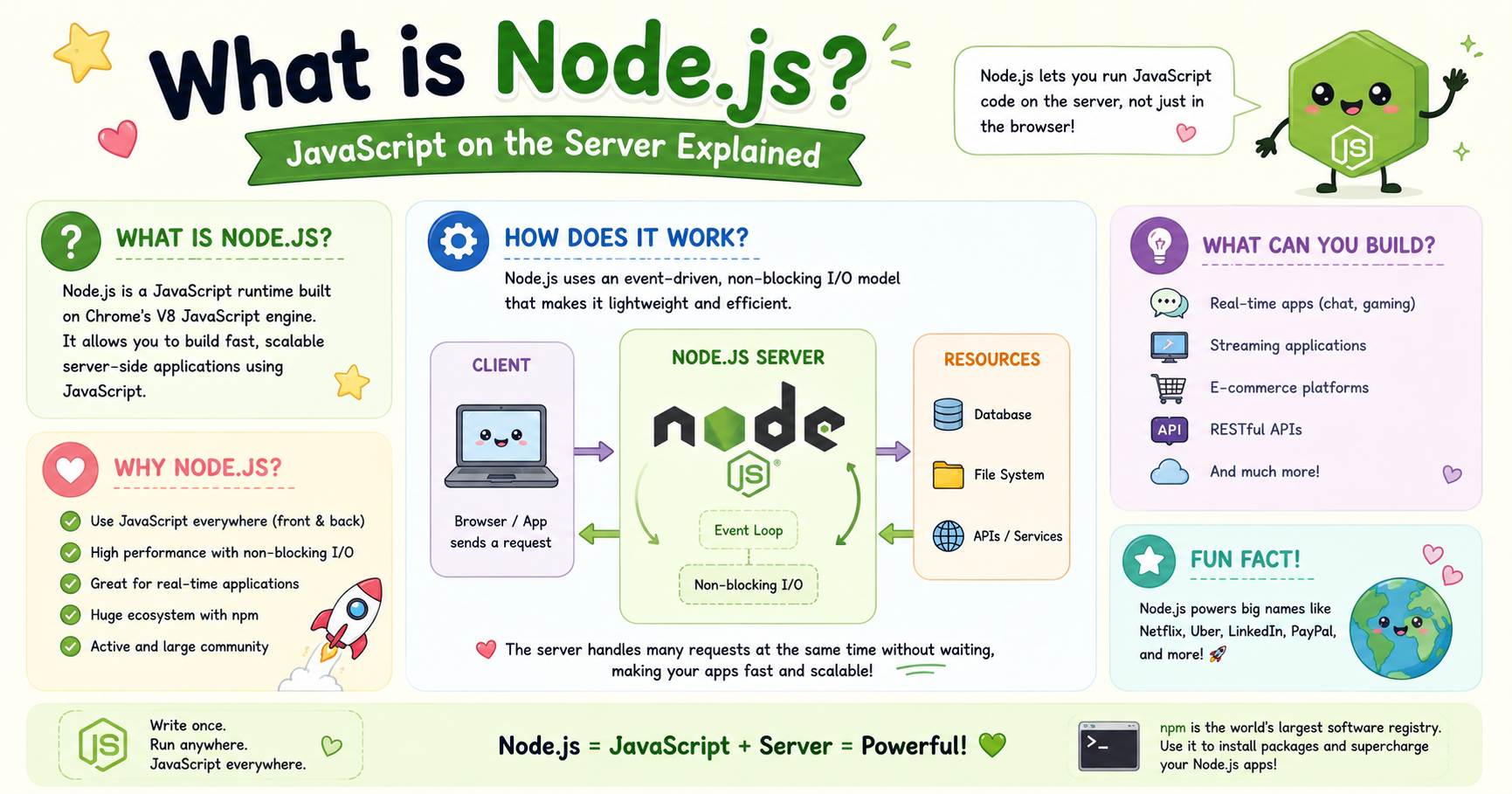
JavaScript was originally designed to make web pages interactive inside browsers. For many years, developers used it only for frontend tasks like form validation, animations, button clicks, and dynamic content updates. But modern web applications require much more than browser interactivity. They also need servers, databases, APIs, authentication systems, and real-time communication.
This is where Node.js changed the JavaScript ecosystem completely.
Node.js made it possible to run JavaScript outside the browser, especially on servers. Today, it powers APIs, streaming services, chat applications, developer tools, and even large-scale enterprise systems.
This article explains what Node.js is, how it works at a high level, and why it became one of the most important technologies in modern web development.
What Node.js Is
Node.js is an open-source runtime environment that allows developers to run JavaScript code outside a web browser.
In simple terms, Node.js lets JavaScript work on the server side.
Before Node.js existed, JavaScript mainly lived inside browsers like:
Google Chrome
Mozilla Firefox
Safari
Browsers execute JavaScript so websites can respond to user actions. Node.js took that same language and allowed it to run directly on operating systems like Windows, Linux, and macOS.
This means JavaScript can now:
Create web servers
Handle databases
Build APIs
Read and write files
Process requests from users
Manage backend logic
A developer can use JavaScript for both frontend and backend development, which is one reason Node.js became extremely popular.
Why JavaScript Was Originally Browser-Only
JavaScript was created in 1995 mainly for browser environments. At that time, websites were mostly static HTML pages. Browsers needed a scripting language to add dynamic behavior.
For example:
Showing alerts
Validating forms before submission
Changing page content without reloading
Responding to clicks and keyboard input
Browsers provided the environment where JavaScript could run safely. They exposed features like:
The DOM (Document Object Model)
Window objects
Browser events
User interaction APIs
Because of this dependency on browser-provided features, JavaScript was tightly connected to browsers for many years.
Server-side programming was handled by other languages such as:
PHP
Java
Python
Ruby
C#
These languages dominated backend development because JavaScript had no server runtime.
The limitation was not the language itself. JavaScript was capable of general programming. The real issue was that no efficient server environment existed for it yet.
Node.js solved that problem.
How Node.js Made JavaScript Run on Servers
Node.js introduced a runtime that could execute JavaScript independently from browsers. Instead of relying on browser APIs, Node.js provides server-side capabilities through built-in modules and system access.
For example, Node.js can:
Access the file system
Open network connections
Create HTTP servers
Handle operating system tasks
A very small Node.js server looks like this:
const http = require("http");

const server = http.createServer((req, res) => {
  res.end("Hello from Node.js");
});

server.listen(3000);
This code creates a server running on port 3000.
When a browser visits that port, the server responds with text. Before Node.js, JavaScript could not do this outside browsers. This changed web development significantly because developers no longer needed separate languages for frontend and backend systems.
V8 Engine Overview
One major reason Node.js became fast and successful is the V8 engine. V8 was developed by Google for the Chrome browser.
A JavaScript engine is software that reads and executes JavaScript code. Traditionally, interpreted languages were slower because code was translated line by line during execution. V8 improved performance using Just-In-Time (JIT) compilation.
At a high level, V8:
Reads JavaScript code
Compiles it into machine code
Executes it efficiently on the system
Node.js uses the V8 engine outside the browser environment. This gave Node.js major performance advantages compared to older scripting environments.
Event-Driven Architecture Idea
One of the most important concepts behind Node.js is its event-driven architecture. Traditional servers often create a separate thread for every request. This can become expensive when thousands of users connect simultaneously.
Node.js works differently. Instead of blocking execution while waiting for tasks to finish, Node.js uses:
Events
Callbacks
Non-blocking operations
An event loop
Example Idea
Suppose a server needs to read a file.
A blocking system might:
Pause everything
Read the file
Continue afterward
Node.js instead:
Starts reading the file
Continues doing other work
Handles the result when reading finishes
This approach allows Node.js to handle many concurrent connections efficiently. The core concept is asynchronous execution.
For example:
const fs = require("fs");

fs.readFile("data.txt", "utf8", (err, data) => {
  console.log(data);
});

console.log("Reading file...");
The message "Reading file..." appears immediately instead of waiting for the file operation to finish. This non-blocking behavior is one reason Node.js performs well in applications with many simultaneous users.
Real-World Use Cases of Node.js
Node.js is used across many industries and application types.
1. REST APIs
Node.js is widely used for building APIs because it handles requests efficiently.
Popular backend frameworks include:
Express.js
NestJS
Fastify
These frameworks simplify routing, middleware, authentication, and server logic.
2. Real-Time Applications
Node.js works well for applications requiring live communication.
Examples include:
Chat applications
Multiplayer games
Live notifications
Collaborative tools
Because Node.js handles many open connections efficiently, it is commonly used with technologies like WebSockets.
3. Streaming Services
Streaming platforms process continuous data instead of waiting for entire files. Node.js is good at streaming because of its asynchronous architecture.
Examples include:
Video streaming
Audio streaming
File uploads
Data pipelines
4. Full Stack JavaScript Applications
Modern developers often use JavaScript everywhere:
Frontend:
React
Vue.js
Angular
Backend:
- Node.js
This creates a unified development stack where one language powers the entire application.
5. Developer Tools
Many development tools are built using Node.js.
Examples include:
npm
Webpack
Vite
Even frontend developers indirectly use Node.js every day because modern tooling depends heavily on it.
Conclusion
Node.js fundamentally changed web development by allowing JavaScript to run outside browsers.
Before Node.js, JavaScript was limited mostly to frontend interactions. Node.js transformed it into a full backend technology capable of building servers, APIs, real-time systems, and scalable applications.
Its combination of:
the V8 engine,
asynchronous execution,
event-driven architecture,
and a massive ecosystem
made it one of the most influential technologies in modern software development.
Today, Node.js is used by startups, enterprises, cloud platforms, and developers worldwide to build fast and scalable applications using a single language across the entire stack.


