

Understanding Variables and Data Types in JavaScript
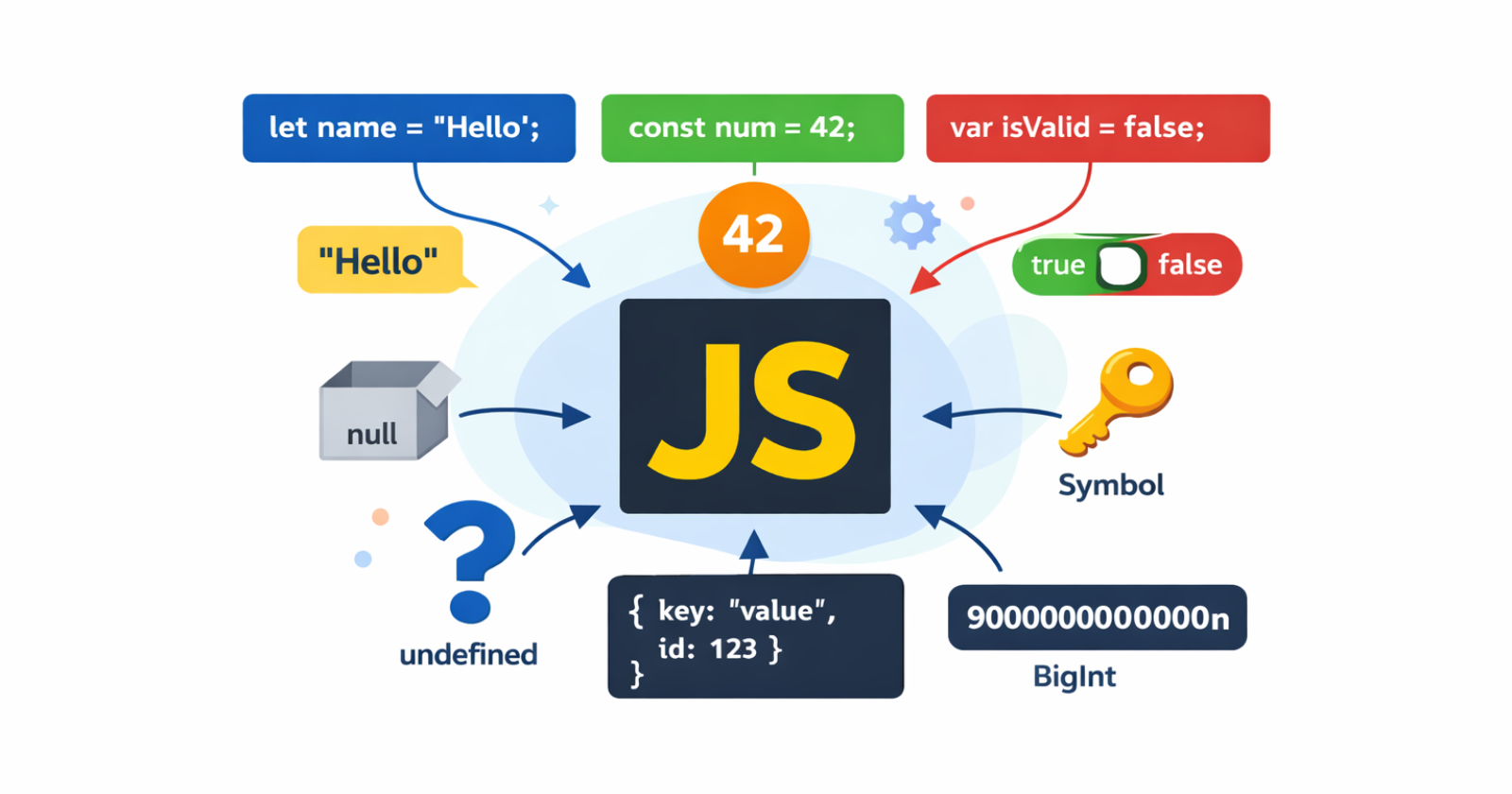
To learn any programming language, understanding its variables and data types is essential, as these are the fundamental building blocks of any programming language.
Variables are like empty boxes where you store something and label it with proper naming. The label on the box is the variable name, and the content inside the box is the value. In JS, you use variables to store and manage data.
What Variables Are and Why They Are Needed
A named storage location in memory is called a variable. Variables are needed for:
Changing values during program execution
User input
Reusing the same data
Without variables, programs would not be able to store or update information.
Example:
let name = "Pritam";
console.log(name);
Here:
nameis the box."Pritam"is the value stored inside it.
How to declare variables using var, let, and const
JavaScript lets you declare variables using three keywords: var, let & const.
Using var
var is the older way to declare variables.
var age = 25;
Using let
The let keyword was introduced in JavaScript in ES6 (ECMAScript 2015). let is the modern way to declare variables that can change.
let age = 25;
Using const
const is used for values that are constant. You can not reassign values to these variables after initializing once.
const birthYear = 2000;
birthYear = 2005;
Primitive data types
Datatypes define what kind of data can be stored in a variable. There are 7 types of primitive data types in JavaScript.
String
A string is a collection of characters. It must be written in ("",'' or ``).
Example:
let name = "Pritam";
Number
It represents numerical values. Number datatype includes both integer & decimal numbers.
let age = 22;
let price = 199.99;
BigInt
It represents whole numbers that are larger than the safe limit for the number data type. You can create a BigInt by appending n to the end of an integer.
let largeNumber = 84545985384938493849384938n;
Boolean
A Boolean value can be only true or false.
let isStudent = true;
Null
Null is an intentional empty value. It is different from undefined.
let middleName = null;
Note: In JS,
nullis a primitive data type. However,typeof nullreturns object. It's a known bug in JS. Learn more about this bug here.
Undefined
When you declare a variable but do not assign a value, it stays undefined.
let score;
console.log(score); // undefined
Symbol
A symbol data type is always unique in JavaScript. It is often used as an identifier for object properties to avoid naming conflicts.
let uniqueValue = Symbol("unique");
JavaScript has one Non-Primitive Datatype called Object. It includes Array, Function, Date, RegExp, etc.
Basic difference between var, let, and const
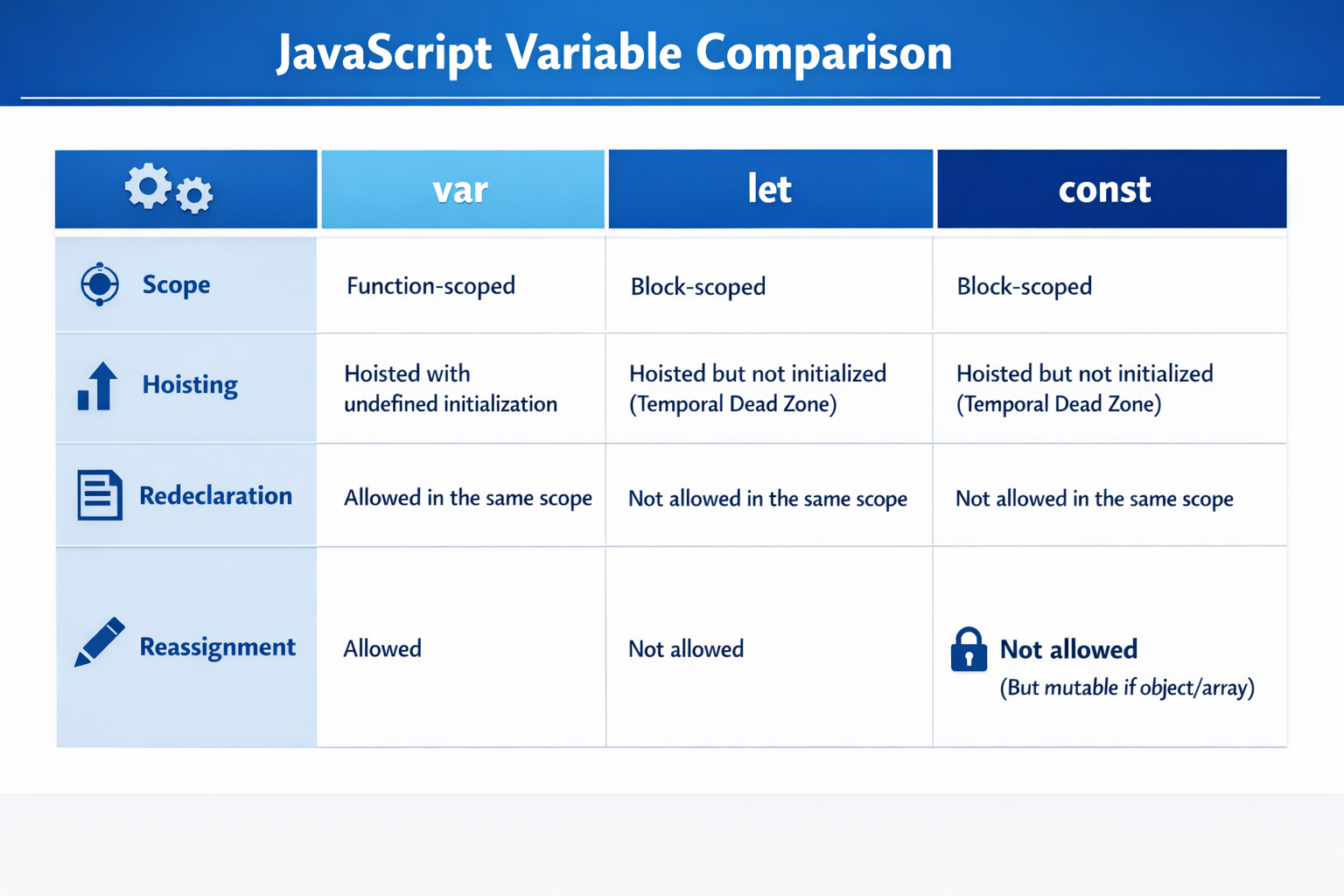
What is scope?
Scope decides where a variable can be accessed. For example, you have a box in a room inside your home. Only people who are inside the room can access the box.
Global Scope
If a variable is declared outside any method or block, it has global scope.
let name = "Pritam";

function greet() {
  console.log(name);
}
Here, the variable name is accessible everywhere in the file.
Block Scope
When a variable is declared inside curly braces {}, it has block scope. Only let and const are block scoped. var does not strictly follow this rule.
{
  let age = 25;
  console.log(age); // 25
}

console.log(age); // Uncaught ReferenceError: age is not defined
Conclusion
Before ending, let's have a recap of what we have learned today:
A variable is just a container with a named label.
You can declare a variable in JavaScript using
var,let, andconst.JavaScript has 7 primitive data types: String, Number, BigInt, Boolean, Null, Undefined, and Symbol.
letandconstare block-scoped, andconstprevents reassignment of value.
Learning variables and data types is the foundation of JavaScript. Further topics such as functions, arrays, and objects, totally depend on basic a understanding of variables and their types.


