

Understanding HTML Tags and Elements
When you open any website, what you actually see is the result of many layers working together on design, logic, data, and structure. HTML provides that structure. If a webpage were a human body, HTML would be the skeleton. It doesn’t decide colors, animations, or behavior, but it defines what exists on the page and how it is arranged.
This article will walk you through HTML tags and elements in a beginner-friendly way, using simple analogies and short examples. By the end, you’ll clearly understand what tags and elements are, how they differ, and how they form the foundation of every webpage.
What HTML is and why we use it
HTML stands for Hypertext Markup Language. Despite the word language, HTML is not a programming language. It doesn’t contain logic, conditions, or loops. Instead, it is a markup language, meaning it marks up content to describe its structure.
Without HTML, a browser would not know how to display content meaningfully. All websites whether simple blogs or complex web apps, it all starts with HTML. HTML comes first. Everything else builds on top of it.
What an HTML tag is
An HTML tag is a keyword wrapped inside angle brackets < >. Tags tell the browser what type of content they are dealing with. Think of a tag like a label on a box. This box may contain a heading, a paragraph or an image.
Example: h1, p, div, span etc.
Each of these tags has a specific meaning:
<h1>is a heading tag<p>is a paragraph tag<div>represents a block level element<span>represents inline level element
Opening tag, closing tag, and content
Most html tags has these properties:
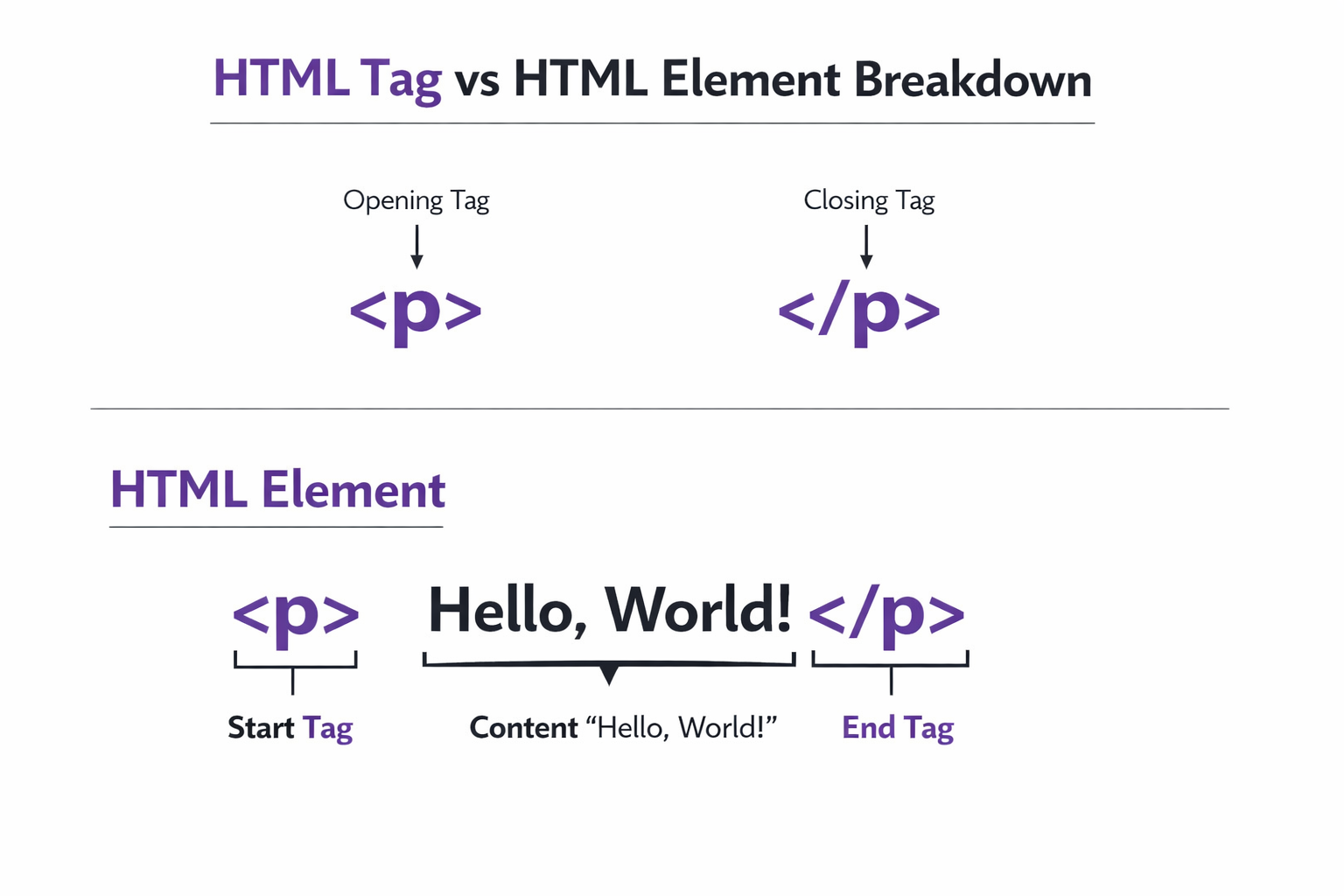
Opening tag
Content
Closing tag
Example:
<h1>This is a heading.</h1>
Let’s break it down:
<h1>→ opening tagThis is a heading.→ content</h1>→ closing tag
The closing tag looks almost the same as the opening tag, except it includes a forward slash (/). This tells the browser where the content ends.
What an HTML element means
This is where most beginners get confused. An HTML element is the complete unit of opening ta, content, and closing tag.
Tag vs Element
HTML tag is just the markup (<p> </p>).
HTML element is the full structure including content (<p>This is a paragraph</p>).
Self-closing (void) elements
Not all HTML elements wrap content. Some elements are self-closing, also called void elements. These elements do not have content and they do not need a closing tag also.
Example:
<img>→ Image tag.<br>→ Line break tag.<hr>→ Horizontal Rule tag.
Why are these different? Because these elements represent something that doesn’t contain text or other elements. An image doesn’t wrap content, image itself is a content.
For example:
<img src="logo.png" alt="Website Logo">
Block-level vs Inline elements
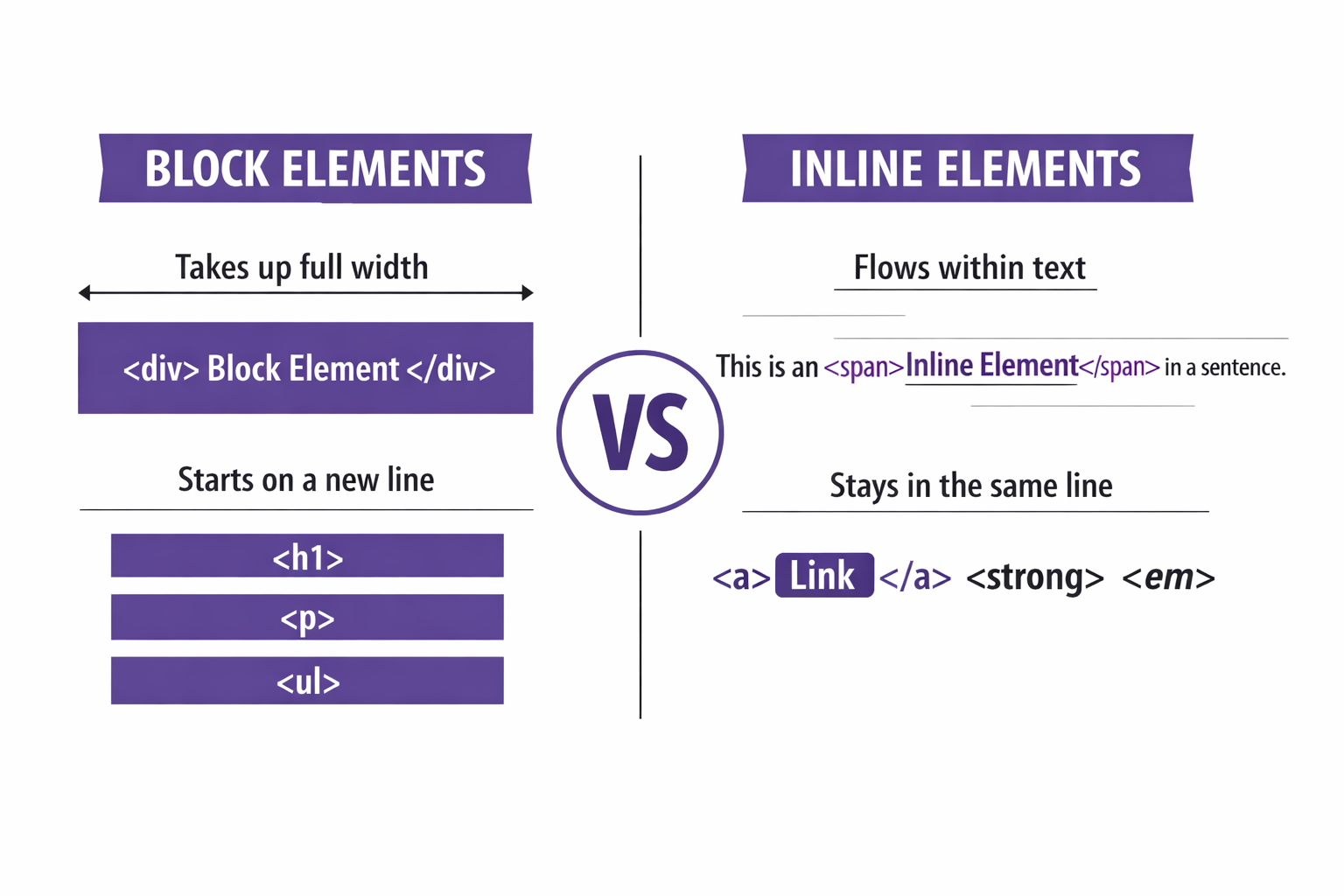
One of the most important concepts in HTML layout is understanding block-level and inline elements.
| Features | Block-Level | Inline |
| Display | Start on a new line | Do not start on a new line |
| Width | Take up the full width available | Only take as much width as needed |
| Position | Stack vertically | Sit inside block-level elements |
| Example | <h1>, <p>, <div>, <section> | <span>, <a>, <em>, <strong> |
Commonly used HTML tags
Here are some commonly used HTML tags every beginner should know:
Headings
<h1>Main Heading</h1>
<h2>Sub Heading</h2>
<h3>Smaller Heading</h3>
<h4>More Smaller Heading</h4>
<h5>More Smaller Heading</h5>
<h6>Most Smaller Heading</h6>
Headings define hierarchy, not only font size.
Paragraph
<p>This is a paragraph.</p>
Div (Container)
<div>
  <p>Content inside a div</p>
</div>
Used to group elements together.
Span (Inline Container)
<span>Inline text</span>
Link
<a href="https://example.com">Visit Site</a>
Used to link another html page.
Image
<img src="photo.jpg" alt="A photo">
Line Break
<br>
These tags form the core vocabulary of HTML.
Inspecting HTML in the Browser
One of the best ways to learn HTML is by inspecting webpages:
Right-click on any webpage
Click Inspect
Look at the HTML structure
You’ll see how real websites are built using the same tags you’re learning. This turns HTML from theory into something real and tangible.
Conclusion
HTML tags and elements are the foundation of web development. Once you understand tags & elements, block and inline elements everything else becomes easier.
CSS styling makes more sense, JavaScript interactions feel clearer, and debugging becomes less scary. HTML is simple by design. Mastering these basics gives you a strong base to build anything on the web.


