

The Node.js Event Loop Explained
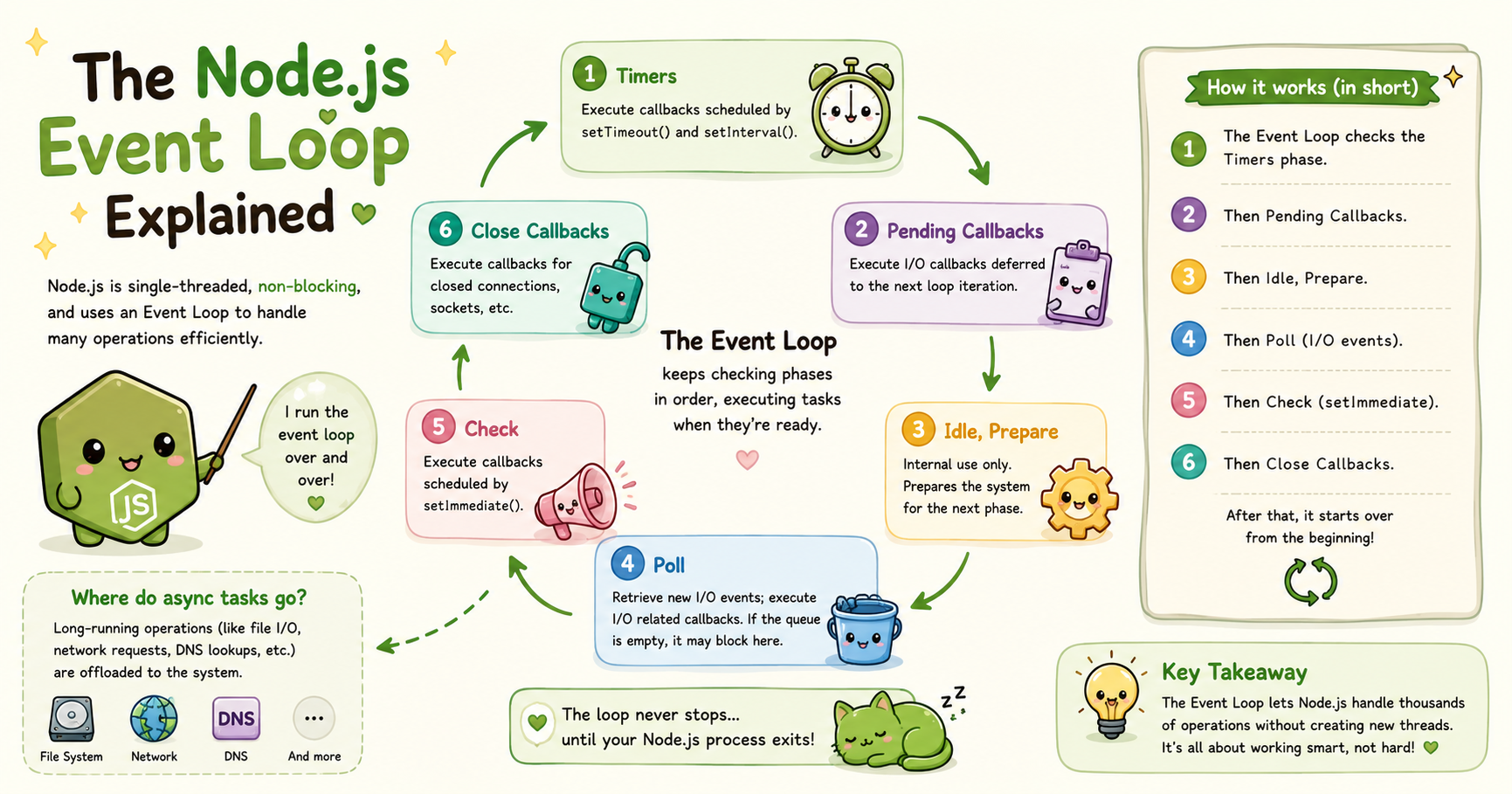
When developers first start learning Node.js, one of the most confusing concepts is the event loop. It sounds complicated, but the core idea is actually simple: the event loop allows Node.js to handle many operations efficiently without creating a separate thread for every task.
Understanding the event loop is important because it explains why Node.js performs so well in applications like chat systems, APIs, streaming platforms, and real-time applications. Instead of blocking the program while waiting for operations like file reading or database requests, Node.js keeps moving and processes other work in the meantime.
This article explains the Node.js event loop in a beginner-friendly way, focusing on concepts rather than deep internal implementation details.
What the Event Loop Is
The event loop is a mechanism that allows Node.js to manage asynchronous operations efficiently. In simple terms, it continuously checks whether there is work waiting to be processed. If there is, it executes that work. If not, it waits for new tasks.
You can think of the event loop as a manager that repeatedly performs three steps:
Check for completed tasks
Move ready tasks into execution
Run them one by one
This process happens extremely fast and continuously while the application is running.
Unlike traditional server systems that often create multiple threads for handling requests, Node.js mainly works using a single main thread with an event-driven model. The event loop is what makes this possible.
Why Node.js Needs an Event Loop
JavaScript was originally designed to run inside web browsers. In browsers, JavaScript handled user interactions like button clicks, form validation, and animations.
Because of this, JavaScript was built as a single-threaded language. That means it executes one operation at a time. This creates a problem for server-side programming.
Imagine a server receiving thousands of requests:
Database queries
File reads
API requests
Authentication checks
Image uploads
If JavaScript waited for each operation to finish before moving to the next one, the server would become extremely slow.
For example:
const data = readBigFile();
console.log(data);
If readBigFile() takes 5 seconds, the entire application would stop during those 5 seconds. That is unacceptable for modern servers. Node.js solves this problem using asynchronous programming and the event loop.
Instead of waiting for long operations to finish, Node.js delegates them to the system and continues executing other tasks. Once the operation completes, the event loop processes the result later.
This approach allows Node.js to remain responsive even under heavy load.
Task Queue vs Call Stack
To understand the event loop, you need a conceptual understanding of two important parts:
The call stack
The task queue
The Call Stack
The call stack is where JavaScript executes functions. When a function is called, it gets pushed onto the stack. When it finishes, it gets removed.
Example:
function greet() {
  console.log("Hello");
}

greet();
Execution flow:
greet()enters the stackconsole.log()executesgreet()exits the stack
The stack only executes one task at a time.
The Task Queue
The task queue stores asynchronous callbacks that are ready to run. These callbacks wait until the call stack becomes empty.
Example:
setTimeout(() => {
  console.log("Timer done");
}, 1000);

console.log("Start");
Output:
Start
Timer done
The event loop acts as the coordinator between the call stack and the task queue.
How Async Operations Are Handled
Node.js uses asynchronous operations heavily.
Examples include:
Reading files
Database requests
Network requests
Timers
API calls
When Node.js encounters an async operation, it does not perform the work directly on the main JavaScript thread.
Instead, it hands the operation off to:
The operating system
Internal worker threads
Networking systems
While that work is happening externally, JavaScript continues running other code.
Example:
const fs = require("fs");

fs.readFile("demo.txt", "utf8", (err, data) => {
  console.log(data);
});

console.log("Reading file...");
Possible output:
Reading file...
File contents here
This non-blocking behavior is one of the biggest reasons Node.js became popular for backend development.
Timers vs I/O Callbacks
The event loop processes different types of asynchronous tasks in phases. At a high level, two important categories are:
Timers
I/O callbacks
You do not need to memorize internal phase details as a beginner, but understanding the distinction is useful.
Timers
Timer functions include:
setTimeout()
setInterval()
These schedule code to run after a specified amount of time.
Example:
setTimeout(() => {
  console.log("Executed later");
}, 2000);
The callback does not execute exactly at 2 seconds. Instead:
The timer becomes eligible after 2 seconds
The event loop executes it when the stack becomes available
This is an important distinction.
I/O Callbacks
I/O stands for Input/Output.
Examples:
File reading
Database communication
HTTP requests
Network operations
Example:
fs.readFile("data.txt", () => {
  console.log("File loaded");
});
These callbacks execute when the operation finishes. Unlike timers, I/O completion depends on external systems such as disks, databases, or networks.
Role of the Event Loop in Scalability
The event loop is one of the main reasons Node.js scales well for certain types of applications.
Traditional thread-based servers may create one thread per request. If thousands of users connect simultaneously, thousands of threads may be needed. Threads consume memory and CPU resources. Node.js takes a different approach.
Instead of creating many threads, it uses:
A single main thread
Non-blocking operations
The event loop
Because the application does not pause while waiting for slow operations, Node.js can handle many concurrent connections efficiently.
Conclusion
The Node.js event loop is the system that allows JavaScript to handle asynchronous operations efficiently on the server. Instead of blocking execution while waiting for slow tasks, Node.js delegates those tasks externally and continues processing other work. Once operations complete, the event loop moves their callbacks into execution.
You do not need to understand every internal phase immediately. What matters first is understanding the core principle: Node.js stays fast by avoiding unnecessary waiting. That principle is the foundation of modern Node.js applications.


