

Template Literals in JavaScript
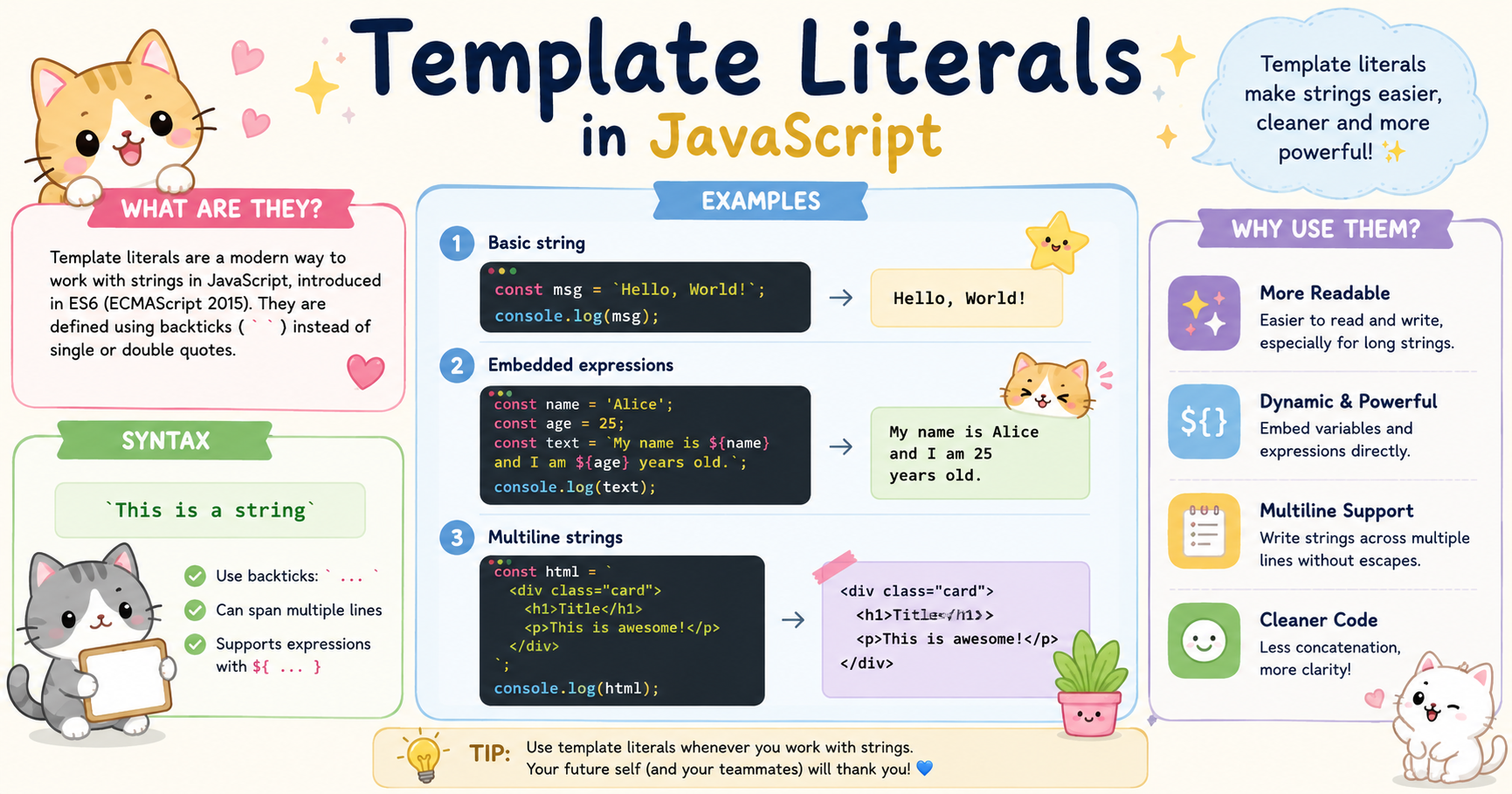
JavaScript has evolved significantly over the years, and one of the most practical additions introduced in ES6 (ECMAScript 2015) is template literals. They simplify string handling, improve readability, and reduce many of the common problems developers faced with traditional string concatenation.
Before template literals existed, building dynamic strings in JavaScript often became messy and difficult to maintain, especially when variables, multi-line content, or embedded expressions were involved. Template literals solved these issues with a cleaner and more expressive syntax.
This article explores what template literals are, why they matter, and how they are used in modern JavaScript development.
Problems with Traditional String Concatenation
Before ES6, developers created dynamic strings using the + operator.
Example:
let name = "Pritam";
let age = 22;

let message = "My name is " + name + " and I am " + age + " years old.";

console.log(message);
This works, but several problems appear as strings become larger or more dynamic.
1. Poor Readability
When multiple variables and strings are combined together, the code becomes difficult to read.
let product = "Laptop";
let price = 55000;

let text = "The product " + product + " costs ₹" + price +
" and is available for delivery.";

console.log(text);
In long strings, the repeated + operators create visual clutter.
2. Multi-line Strings Were Difficult
Creating strings across multiple lines required escape characters (\n) or awkward concatenation.
let paragraph = "JavaScript is a programming language.\n" +
"It is widely used for web development.\n" +
"It runs inside browsers.";

console.log(paragraph);
This approach is not clean and becomes difficult to manage in large blocks of text.
3. Dynamic HTML Became Messy
Frontend developers often generate HTML dynamically. Traditional concatenation made this painful.
let username = "Alex";

let html = "<div class='card'>" +
"<h2>" + username + "</h2>" +
"<p>Welcome to the website</p>" +
"</div>";

console.log(html);
This quickly becomes unreadable in real applications.
4. Easy to Introduce Errors
Missing quotes, spaces, or + operators often caused bugs.
let firstName = "John";
let lastName = "Doe";

let fullName = firstName + lastName;

console.log(fullName);
Output:
JohnDoe
A missing space produced incorrect output.
Template Literal Syntax
Template literals provide a cleaner way to work with strings. Instead of single quotes (') or double quotes ("), template literals use backticks (`).
Basic syntax:
let message = `Hello World`;
The backtick character allows JavaScript to support:
Embedded variables
Multi-line strings
Expression interpolation
Cleaner formatting
Example:
let language = "JavaScript";

let text = `I am learning ${language}`;

console.log(text);
Output:
I am learning JavaScript
The ${} syntax is called expression interpolation.
Embedding Variables in Strings
One of the biggest advantages of template literals is embedding variables directly inside strings.
Traditional Approach
let city = "Kolkata";

let message = "I live in " + city;

console.log(message);
Using Template Literals
let city = "Kolkata";

let message = `I live in ${city}`;

console.log(message);
This is cleaner and easier to understand.
Embedding Multiple Variables
let name = "Pritam";
let profession = "Developer";

let intro = `\({name} is a \){profession}`;

console.log(intro);
Output:
Pritam is a Developer
Embedding Expressions
Template literals can also evaluate JavaScript expressions.
let a = 10;
let b = 20;

let result = `The sum is ${a + b}`;

console.log(result);
Output:
The sum is 30
You are not limited to variables only. Any valid JavaScript expression can be placed inside ${}.
Calling Functions Inside Template Literals
function greet(name) {
    return `Hello ${name}`;
}

let message = `${greet("Alex")}`;

console.log(message);
Output:
Hello Alex
This makes template literals extremely flexible.
Multi-line Strings
Template literals make multi-line strings simple and natural.
Without Template Literals
let text = "JavaScript is powerful.\n" +
"It supports asynchronous programming.\n" +
"It is used everywhere.";

console.log(text);
With Template Literals
let text = `
JavaScript is powerful.
It supports asynchronous programming.
It is used everywhere.
`;

console.log(text);
The formatting is preserved automatically.
This is especially useful for:
HTML templates
Email content
SQL queries
Long text blocks
JSON formatting
Multi-line HTML Example
let username = "Pritam";

let card = `
<div class="profile">
    <h2>${username}</h2>
    <p>Frontend Developer</p>
</div>
`;

console.log(card);
This is significantly cleaner than string concatenation.
Use Cases in Modern JavaScript
Template literals are now heavily used across modern JavaScript ecosystems.
Dynamic UI Rendering
Frameworks like React, Vue, and Angular frequently rely on dynamic string generation.
Example:
let product = "Phone";
let price = 25000;

let message = `\({product} costs ₹\){price}`;
Dynamic values can be inserted naturally.
Generating HTML Templates
Template literals are commonly used in vanilla JavaScript applications.
let users = ["Alex", "Sam", "John"];

let list = `
<ul>
    \({users.map(user => `<li>\){user}</li>`).join("")}
</ul>
`;

console.log(list);
This allows developers to generate structured HTML more efficiently.
API Responses and Logging
Template literals improve debugging and logging readability.
let status = 200;
let endpoint = "/api/users";

console.log(`Request to \({endpoint} returned status \){status}`);
This is easier to read than concatenated logs.
Styled Console Output
Template literals help format complex console messages.
let user = "Pritam";
let loginTime = "10:30 AM";

console.log(`\({user} logged in at \){loginTime}`);
Readable logs become important in large applications.
Conclusion
Template literals are one of the most useful improvements introduced in modern JavaScript. They solve the readability and maintainability issues caused by traditional string concatenation while providing a more expressive syntax for dynamic content.
Their support for embedded expressions, multi-line strings, and cleaner formatting makes them essential in frontend and backend development alike. Whether generating HTML, formatting logs, building API messages, or rendering UI components, template literals simplify the entire process.
Today, template literals are considered standard practice in modern JavaScript codebases because they produce code that is easier to write, easier to understand, and easier to maintain.


