

Synchronous vs Asynchronous JavaScript
JavaScript is one of the most widely used programming languages in modern web development. It powers websites, handles user interactions, fetches data from servers, and creates dynamic experiences in browsers. One of the most important concepts in JavaScript is understanding the difference between synchronous and asynchronous behavior.
This concept becomes critical when applications start handling tasks like API requests, timers, database operations, or file handling. Without asynchronous behavior, modern web applications would feel slow, frozen, and unresponsive.
What Synchronous Code Means
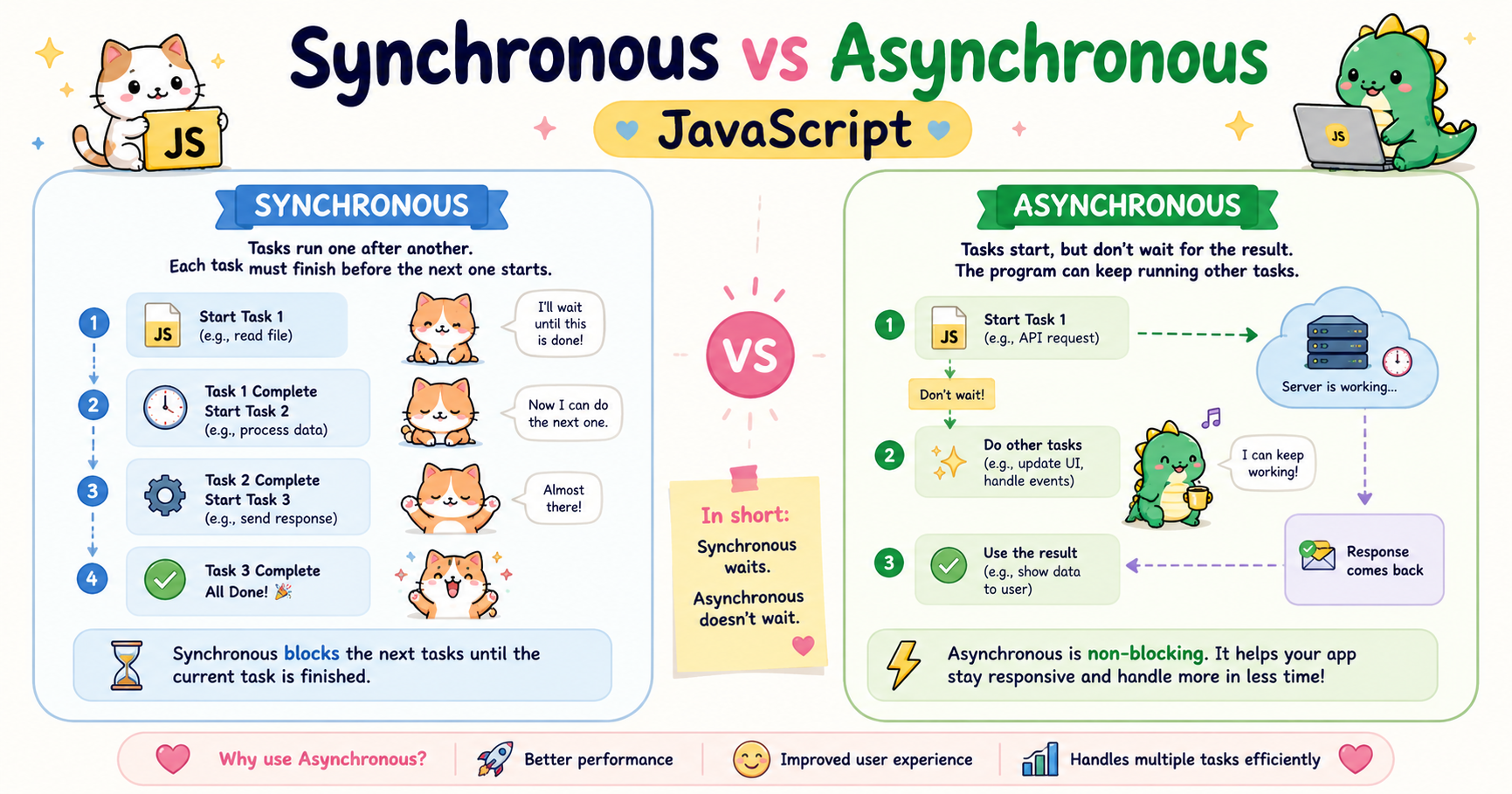
Synchronous code executes line by line in sequence. JavaScript waits for one operation to complete before moving to the next one. Think of it like standing in a queue. One person finishes their work, then the next person gets a turn.
Example:
console.log("Start");

console.log("Middle");

console.log("End");
Output:
Start
Middle
End
The execution order is predictable because every statement blocks the next one until it finishes.
Characteristics of Synchronous Code
Executes one task at a time
Blocks further execution until current work completes
Easier to understand initially
Can create performance problems when tasks are slow
For small programs, synchronous execution is simple and manageable. But real-world applications often involve operations that take time, such as:
Fetching data from an API
Reading files
Waiting for user actions
Database queries
Delays using timers
If JavaScript waited synchronously for all these operations, applications would become unusable.
What Asynchronous Code Means
Asynchronous code allows JavaScript to start a task and continue executing other code without waiting for that task to finish immediately. Instead of blocking the program, the operation runs in the background. When it completes, JavaScript handles the result later.
Example:
console.log("Start");

setTimeout(() => {
  console.log("Timer Finished");
}, 2000);

console.log("End");
Output:
Start
End
Timer Finished
Even though the timer appears before "End" in the code, JavaScript does not wait for the timer to complete. It schedules the timer and continues executing the remaining code. This is asynchronous behavior.
Why JavaScript Needs Asynchronous Behavior
JavaScript was originally designed to run inside web browsers. Browsers need to remain responsive while users interact with pages. Imagine a situation where JavaScript blocks everything while waiting for data from a server.
Example:
User clicks a button
Browser requests data from an API
Server takes 5 seconds to respond
Entire page freezes for 5 seconds
That would create a terrible user experience.
Asynchronous programming solves this problem by allowing JavaScript to continue running other tasks while waiting for slower operations.
This enables:
Smooth user interfaces
Faster applications
Better responsiveness
Non-blocking behavior
Without asynchronous execution, modern applications like social media platforms, video streaming services, chat systems, or online games would not function efficiently.
JavaScript Is Single-Threaded
One important detail is that JavaScript is single-threaded. This means JavaScript executes one instruction at a time using a single call stack.
So how does asynchronous behavior work? The environment around JavaScript such as the browser or Node.js runtime provides features like:
Timers
Network requests
Event handling
File system operations
These operations are handled outside the main JavaScript execution thread. Once they finish, their callbacks are placed into queues and executed later. This system allows JavaScript to appear asynchronous even though the language itself runs on a single thread.
Examples of Asynchronous Operations
1. Timers
Timers are one of the simplest asynchronous examples.
setTimeout(() => {
  console.log("Executed later");
}, 1000);

console.log("Executed immediately");
Output:
Executed immediately
Executed later
The timer waits in the background while JavaScript continues execution.
2. API Calls
Fetching data from a server is another common asynchronous task.
Example using fetch():
fetch("https://api.example.com/data")
  .then(response => response.json())
  .then(data => {
    console.log(data);
  });

console.log("Fetching data...");
The API request may take seconds depending on network speed. JavaScript does not block the program while waiting. This behavior is essential for modern applications.
3. User Events
Button clicks, keyboard input, and mouse movements are also asynchronous.
Example:
button.addEventListener("click", () => {
  console.log("Button clicked");
});
JavaScript waits for the event to occur while continuing other execution.
Problems That Occur With Blocking Code
Blocking code prevents the program from doing anything else until the current task finishes. This creates major performance and usability issues.
Example of Blocking Behavior
function heavyTask() {
  let start = Date.now();

  while (Date.now() - start < 5000) {
    // Blocking loop
  }
}

console.log("Start");

heavyTask();

console.log("End");
The program freezes for 5 seconds before printing "End".
During this time:
The browser becomes unresponsive
Buttons cannot be clicked
Animations stop
User interactions freeze
This is dangerous in real applications.
Conclusion
Synchronous and asynchronous behavior form the foundation of how JavaScript applications operate. Synchronous code executes sequentially and is easier to follow, but it blocks execution while tasks complete. Asynchronous code allows JavaScript to handle long-running operations without freezing the application, making modern web experiences possible.
JavaScript depends heavily on asynchronous programming because browsers and applications must stay responsive while handling network requests, timers, user interactions, and background operations.
Understanding this difference is critical for building efficient applications. Developers who understand asynchronous behavior can write faster, smoother, and more scalable JavaScript programs while avoiding performance issues caused by blocking code.


