

Spread vs Rest Operators in JavaScript
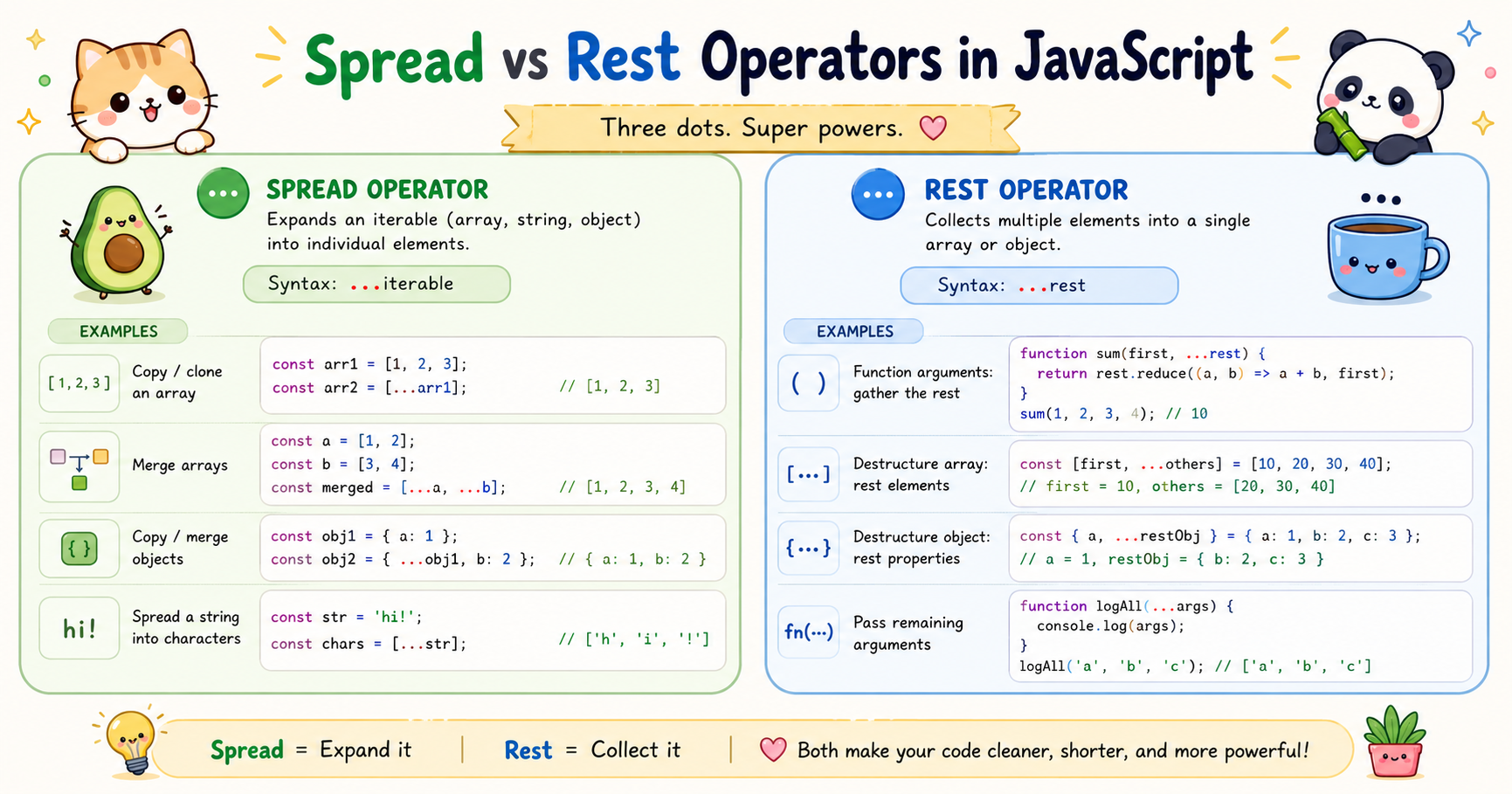
Modern JavaScript introduced several features that made code cleaner and easier to maintain. Among the most useful are the spread (...) and rest (...) operators. At first glance, they look identical because both use three dots. However, they serve completely different purposes depending on where and how they are used.
Understanding these operators is important because they appear everywhere in modern JavaScript applications, especially in React, Node.js, API handling, state management, and functional programming patterns.
This article explains what the spread and rest operators do, how they differ, and where they are practically useful.
What the Spread Operator Does
The spread operator expands iterable values or object properties into individual elements. In simple terms, it “spreads out” the contents of an array or object.
The syntax looks like this:
...
But its behavior depends on the context.
Spread with Arrays
Suppose you have an array:
const numbers = [1, 2, 3];
Using spread:
console.log(...numbers);
Output:
1 2 3
Instead of printing the array as a single structure, spread expands each value individually. This becomes especially useful when combining arrays.
Combining Arrays
const fruits = ["apple", "banana"];
const vegetables = ["carrot", "potato"];

const food = [...fruits, ...vegetables];

console.log(food);
Output:
["apple", "banana", "carrot", "potato"]
Without spread, you would need older methods like concat().
Copying Arrays
Spread also helps create shallow copies.
const original = [1, 2, 3];
const copy = [...original];

console.log(copy);
This creates a new array instead of referencing the same memory location.
Why this matters:
const a = [1, 2];
const b = a;

b.push(3);

console.log(a);
Output:
[1, 2, 3]
Both variables point to the same array.
Using spread avoids this issue:
const a = [1, 2];
const b = [...a];

b.push(3);

console.log(a);
Output:
[1, 2]
Using Spread with Objects
Spread also works with objects.
const user = {
  name: "Pritam",
  age: 22
};

const copiedUser = { ...user };

console.log(copiedUser);
Output:
{
  name: "Pritam",
  age: 22
}
Again, this creates a shallow copy.
What the Rest Operator Does
While spread expands values, the rest operator collects multiple values into a single structure.
Think of it this way:
Spread = unpack values
Rest = pack values
Rest in Function Parameters
One of the most common uses is handling unknown numbers of arguments.
function sum(...numbers) {
  return numbers.reduce((total, num) => total + num, 0);
}

console.log(sum(1, 2, 3, 4));
Output:
10
Here, all arguments are collected into the numbers array. Without rest parameters, developers previously used the arguments object, which was less flexible and not a real array.
Rest with Array Destructuring
Rest can collect remaining array values.
const numbers = [1, 2, 3, 4, 5];

const [first, second, ...remaining] = numbers;

console.log(first);
console.log(second);
console.log(remaining);
Output:
1
2
[3, 4, 5]
This pattern is useful when separating important values from the rest of the data.
Rest with Object Destructuring
The same concept applies to objects.
const user = {
  name: "Pritam",
  age: 22,
  city: "Kolkata"
};

const { name, ...otherDetails } = user;

console.log(name);
console.log(otherDetails);
Output:
Pritam
{
  age: 22,
  city: "Kolkata"
}
This is commonly used when removing properties from objects without mutating the original object.
Differences Between Spread and Rest
Although both operators use the same syntax (...), their behavior depends entirely on context.
| Feature | Spread Operator | Rest Operator |
|---|---|---|
| Purpose | Expands values | Collects values |
| Direction | Unpacks | Packs |
| Common Usage | Arrays, objects, function calls | Function parameters, destructuring |
| Output | Individual elements | Single array/object |
| Example | ...[1,2,3] |
(...args) |
Practical Use Cases
These operators are not just syntax shortcuts. They solve real problems in application development.
React State Updates
In React, state should not be mutated directly.
Instead of:
user.name = "Rahul";
Developers use spread:
setUser({
  ...user,
  name: "Rahul"
});
This creates a new object while preserving immutability.
Removing Properties from Objects
Suppose an API response contains sensitive information.
const user = {
  name: "Pritam",
  password: "123456",
  email: "test@gmail.com"
};

const { password, ...safeUser } = user;

console.log(safeUser);
Output:
{
  name: "Pritam",
  email: "test@gmail.com"
}
The password is excluded cleanly.
Function Flexibility
Rest parameters make functions adaptable.
function logMessages(...messages) {
  messages.forEach(msg => console.log(msg));
}

logMessages("Hello", "Welcome", "JavaScript");
This avoids fixed argument limits.
Cloning Data Before Modification
Spread is widely used to avoid accidental mutations.
const original = {
  theme: "dark"
};

const updated = {
  ...original,
  theme: "light"
};
This pattern is important in Redux, React, and state management systems.
Combining API Data
Applications often merge responses from different sources.
const basicInfo = {
  name: "Pritam"
};

const socialLinks = {
  github: "github.com/example"
};

const completeProfile = {
  ...basicInfo,
  ...socialLinks
};
Spread makes this process simple and readable.
Limitation: Shallow Copy
One important detail is that spread creates only a shallow copy.
Example:
const user = {
  name: "Pritam",
  address: {
    city: "Kolkata"
  }
};

const copiedUser = { ...user };

copiedUser.address.city = "Delhi";

console.log(user.address.city);
Output:
Delhi
Nested objects are still shared by reference. For deeply nested structures, other techniques like structured cloning or libraries may be needed.
Conclusion
The spread and rest operators are among the most practical features in modern JavaScript. Even though both use the same ... syntax, they solve opposite problems. Spread expands data and Rest collects data.
Together, these operators reduce boilerplate code, improve readability, and support safer programming patterns. They are now foundational parts of modern JavaScript development, especially in frameworks like React and backend systems built with Node.js.


