

JavaScript Promises Explained for Beginners
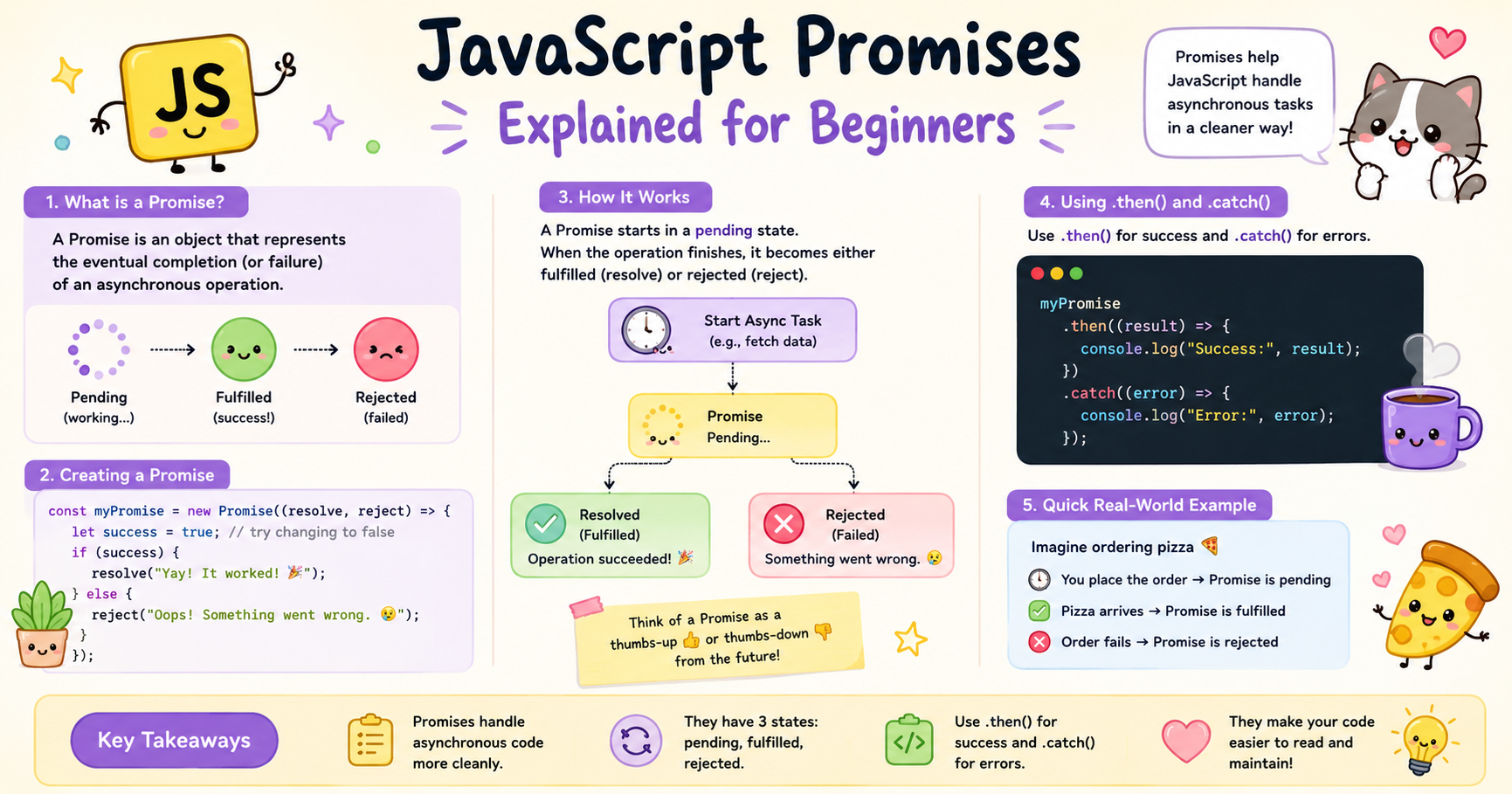
JavaScript is single-threaded, but modern web applications constantly perform tasks that take time. Fetching data from APIs, reading files, handling timers, or interacting with databases are all asynchronous operations. If JavaScript waited for each task to finish before moving forward, applications would become slow and unresponsive.
Promises were introduced to solve this problem in a cleaner and more manageable way.
What Problem Promises Solve
Before promises became common, JavaScript developers heavily relied on callbacks for asynchronous operations.
Example using callbacks:
setTimeout(() => {
  console.log("Task completed");
}, 2000);
Callbacks work fine for small tasks, but problems appear when multiple asynchronous operations depend on each other.
Example:
getUser(function(user) {
  getOrders(user.id, function(orders) {
    getPayment(orders[0], function(payment) {
      console.log(payment);
    });
  });
});
This deeply nested structure is often called callback hell.
Problems with callback-based code:
Difficult to read
Hard to debug
Error handling becomes messy
Maintaining large async flows becomes painful
Promises solve these issues by providing:
Better structure
Cleaner chaining
Centralized error handling
Improved readability
Promises represent the eventual completion or failure of an asynchronous operation.
Understanding a Promise
A promise is an object that represents a future result.
Think of it like ordering food online.
You place the order → pending
Food arrives → fulfilled
Restaurant cancels → rejected
In JavaScript, promises work similarly.
Basic syntax:
const promise = new Promise((resolve, reject) => {
  // async task
});
The Promise constructor takes a function with two parameters:
resolve→ called when operation succeedsreject→ called when operation fails
Example:
const myPromise = new Promise((resolve, reject) => {
  let success = true;

  if (success) {
    resolve("Operation successful");
  } else {
    reject("Operation failed");
  }
});
Promise States
A promise has three possible states.
1. Pending
The initial state. The operation is still running and no result is available yet.
const promise = new Promise((resolve, reject) => {
  // still processing
});
The promise remains pending until either resolve() or reject() is called.
2. Fulfilled
The operation completed successfully.
resolve("Data received");
The promise now contains a successful result.
3. Rejected
The operation failed.
reject("Server error");
The promise now contains an error or failure reason. A promise can move from pending to fulfilled or rejected. But once settled, its state cannot change again. This behavior is important because it makes promises predictable.
Basic Promise Lifecycle
Let’s understand the lifecycle step by step.
Example:
const fetchData = new Promise((resolve, reject) => {
  setTimeout(() => {
    resolve("User data loaded");
  }, 2000);
});

console.log(fetchData);
Initially:
Promise { <pending> }
After 2 seconds:
Promise { "User data loaded" }
Lifecycle flow:
Promise created
Async operation starts
Promise stays pending
Operation succeeds or fails
Promise becomes fulfilled or rejected
Result gets handled using
.then()or.catch()
Handling Success and Failure
Promises provide built-in methods for handling results.
Using .then()
.then() handles successful completion.
Example:
const promise = new Promise((resolve, reject) => {
  resolve("Data fetched successfully");
});

promise.then((result) => {
  console.log(result);
});
Output:
Data fetched successfully
The value passed to resolve() becomes available inside .then().
Using .catch()
.catch() handles errors.
Example:
const promise = new Promise((resolve, reject) => {
  reject("Network error");
});

promise.catch((error) => {
  console.log(error);
});
Output:
Network error
The value passed to reject() becomes available inside .catch().
Handling Both Success and Failure Together
Example:
const login = new Promise((resolve, reject) => {
  const loggedIn = false;

  if (loggedIn) {
    resolve("Login successful");
  } else {
    reject("Invalid credentials");
  }
});

login
  .then((message) => {
    console.log(message);
  })
  .catch((error) => {
    console.log(error);
  });
This structure is far cleaner than deeply nested callbacks.
Promise Chaining Concept
One of the biggest advantages of promises is chaining. A .then() method returns another promise, allowing multiple async operations to run in sequence.
Example:
const fetchUser = new Promise((resolve, reject) => {
  resolve({ id: 1, name: "Pritam" });
});

fetchUser
  .then((user) => {
    console.log(user);

    return user.id;
  })
  .then((id) => {
    console.log("User ID:", id);

    return "Profile loaded";
  })
  .then((message) => {
    console.log(message);
  })
  .catch((error) => {
    console.log(error);
  });
Output:
{ id: 1, name: "Pritam" }
User ID: 1
Profile loaded
Each .then() receives the value returned from the previous .then(). This creates a clean pipeline of asynchronous tasks.
Error Propagation in Chains
One useful feature of promise chains is centralized error handling. If any .then() throws an error, execution jumps directly to .catch().
Example:
Promise.resolve("Start")
  .then((result) => {
    console.log(result);

    throw new Error("Something went wrong");
  })
  .then(() => {
    console.log("This will not run");
  })
  .catch((error) => {
    console.log(error.message);
  });
Output:
Start
Something went wrong
This prevents repetitive error handling at every step.
Real-World Use Cases of Promises
Promises are used almost everywhere in modern JavaScript applications.
Common examples:
API requests
Database operations
Authentication systems
File uploads
Timers
Dynamic imports
Example with fetch():
fetch("https://api.example.com/users")
  .then((response) => response.json())
  .then((data) => {
    console.log(data);
  })
  .catch((error) => {
    console.log(error);
  });
The Fetch API itself is promise-based.
Conclusion
Promises solve one of the biggest problems in asynchronous JavaScript: messy callback-based code. They provide a structured way to handle operations that take time, while keeping applications responsive and maintainable.
A promise starts in the pending state, then becomes fulfilled or rejected depending on the outcome of the asynchronous task. Using .then() and .catch(), developers can handle success and failure cleanly without deeply nested code.
Promise chaining further improves readability by allowing sequential asynchronous operations to flow in a flat and predictable structure. This approach became the foundation for modern async programming in JavaScript and later enabled features like async and await.
Understanding promises is essential because they are used throughout modern JavaScript development, especially in APIs, React applications, backend services, and browser-based asynchronous operations.


