

JavaScript Modules: Import and Export Explained
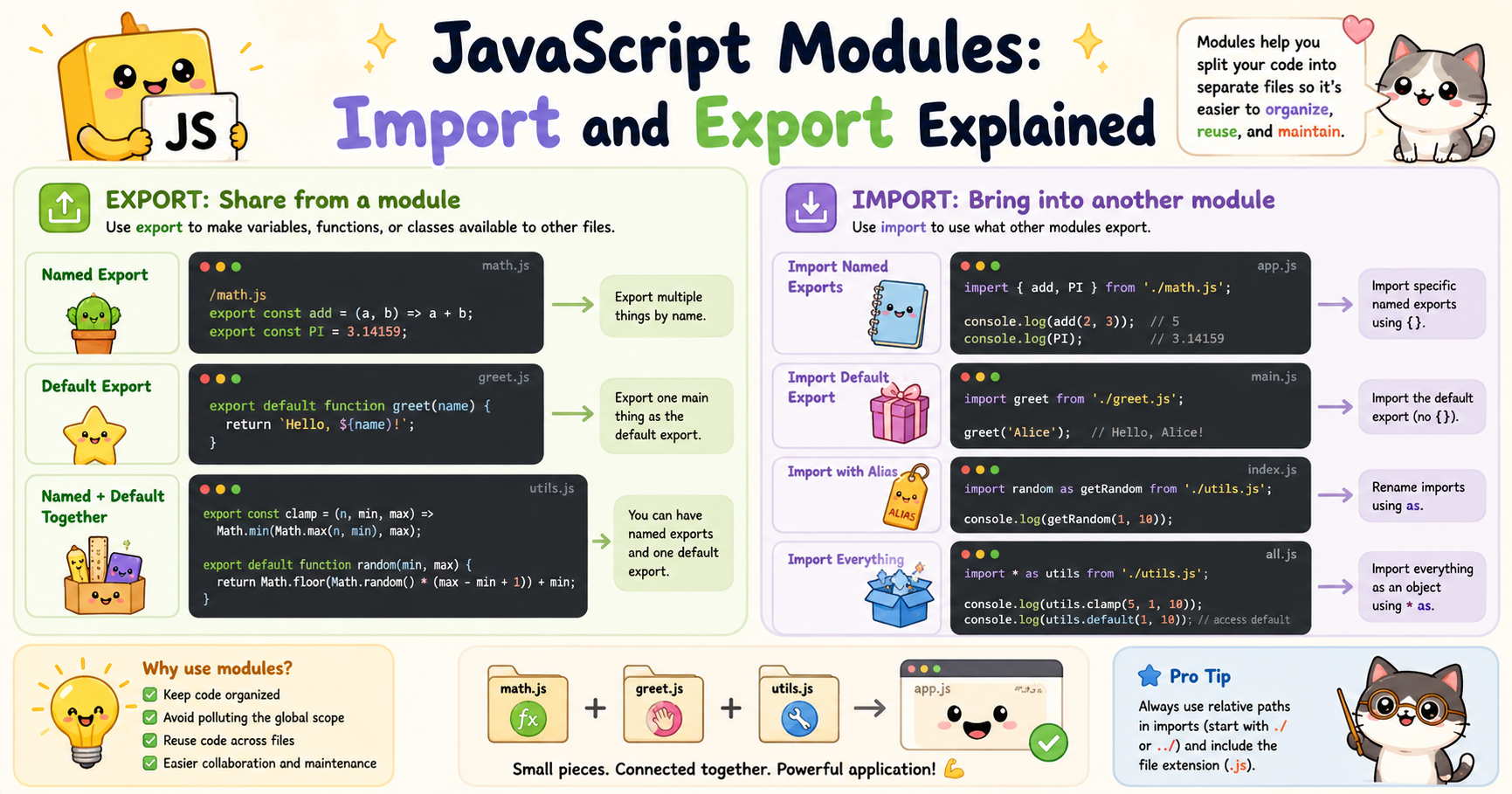
As JavaScript applications grow larger, managing code in a single file becomes difficult. Variables collide, functions become harder to track, and maintaining the codebase turns into a mess. This is where JavaScript modules become important.
Modules allow developers to split code into separate files and organize functionality into reusable pieces. Instead of writing everything in one large script, you can divide your application into smaller logical parts such as authentication, API handling, utilities, UI logic, and database interactions.
Modern JavaScript heavily depends on modules. Frameworks like React, Next.js, and Node.js all use modular architecture because it improves maintainability, scalability, and readability.
Why Modules Are Needed
Before modules existed, developers commonly loaded multiple JavaScript files using <script> tags. This approach created several problems:
Global variables could accidentally overwrite each other
Large projects became difficult to maintain
Reusing code across projects was harder
Dependencies between files were unclear
Debugging became messy
Consider this example:
// file1.js
const username = "Pritam";

// file2.js
const username = "Alex";
If both files are loaded globally, the second variable may overwrite the first one depending on execution order. Modules solve this problem because variables and functions inside a module stay scoped to that module unless explicitly exported. This creates cleaner and safer code.
What is a JavaScript Module?
A module is simply a JavaScript file that can:
Export code
Import code from other files
Each module has its own private scope.
For example:
// math.js
const PI = 3.14;

function add(a, b) {
  return a + b;
}
Nothing from this file is accessible outside unless it is exported.
Exporting Functions or Values
The export keyword is used to make variables, functions, classes, or objects available outside a module.
There are two main export types:
Named exports
Default exports
Named Exports
Named exports allow multiple values to be exported from a file.
Example:
// math.js
export const PI = 3.14;

export function add(a, b) {
  return a + b;
}

export function subtract(a, b) {
  return a - b;
}
Here PI, add, subtract are all exported individually.
You can also export at the bottom:
const PI = 3.14;

function add(a, b) {
  return a + b;
}

function subtract(a, b) {
  return a - b;
}

export { PI, add, subtract };
This approach is common in larger files because it separates logic from exports.
Importing Modules
The import keyword is used to bring exported code into another file.
Example:
// app.js
import { PI, add, subtract } from "./math.js";

console.log(PI);
console.log(add(2, 3));
console.log(subtract(5, 2));
Notice the curly braces {}.
They are required for named imports because you are importing specific exported members. The path "./math.js" refers to the module file.
Importing with Aliases
Sometimes imported names conflict with existing variables or you want clearer naming. You can rename imports using as.
Example:
import { add as sum } from "./math.js";

console.log(sum(4, 5));
This imports add but locally uses the name sum.
Importing Everything
You can import all named exports into a single object.
Example:
import * as MathUtils from "./math.js";

console.log(MathUtils.PI);
console.log(MathUtils.add(2, 3));
This is useful when a module contains many exports.
Default Exports
A module can also export one primary value using default.
Example:
// greet.js
export default function greet(name) {
  return `Hello ${name}`;
}
Importing it:
import greet from "./greet.js";

console.log(greet("Pritam"));
Unlike named imports:
No curly braces are used
The imported name can be anything
Example:
import sayHello from "./greet.js";
This still works because default exports do not require exact naming.
Default vs Named Exports
This is one of the most important concepts in JavaScript modules.
Named Export
export const age = 21;
Import:
import { age } from "./file.js";
Rules:
Must use exact export name
Requires curly braces
Multiple named exports allowed
Default Export
export default function test() {}
Import:
import test from "./file.js";
Rules:
No curly braces
Name can be changed during import
Only one default export per module
Benefits of Modular Code
Modules are not just about syntax. They fundamentally improve software architecture.
1. Better Code Organization
Instead of one huge file:
app.js
You can structure code like:
auth.js
api.js
utils.js
database.js
ui.js
Each file handles a specific responsibility. This makes projects easier to understand.
2. Reusability
Modules can be reused across multiple parts of an application.
Example:
// utils.js
export function formatCurrency(value) {
  return `$${value}`;
}
This utility can be imported anywhere.
3. Easier Maintenance
Smaller files are easier to debug and update.
If authentication logic breaks, you only inspect:
auth.js
instead of searching through thousands of lines.
4. Avoiding Global Scope Pollution
Without modules:
var data = [];
could conflict with another script. Modules isolate scope automatically, reducing accidental overwrites.
5. Scalability
Large applications require team collaboration. Modules allow developers to work independently on separate parts of a project without constantly interfering with each other’s code.
6. Better Dependency Management
Imports clearly show dependencies.
Example:
import axios from "axios";
You instantly know this file depends on Axios. This improves readability and debugging.
Modules in Browsers
To use ES modules in HTML, scripts must include:
<script type="module" src="app.js"></script>
Without type="module", the browser treats the file as a normal script.
Modules also support:
Deferred loading by default
Strict mode automatically
Separate file scope
Modules in Node.js
Node.js also supports modules.
There are two systems:
CommonJS (
require)ES Modules (
import/export)
Modern projects increasingly use ES Modules because they align with browser JavaScript.
Example:
import fs from "fs";
Older CommonJS syntax:
const fs = require("fs");
You will still encounter both in real-world projects.
Conclusion
JavaScript modules are one of the most important improvements in modern JavaScript development. They allow developers to break applications into smaller, reusable, and maintainable pieces.
Understanding how export and import work is essential for working with modern frameworks, backend systems, and scalable applications. Once you become comfortable with modules, large JavaScript projects become significantly easier to structure and manage.


