

How React Virtual DOM Works Under the Hood
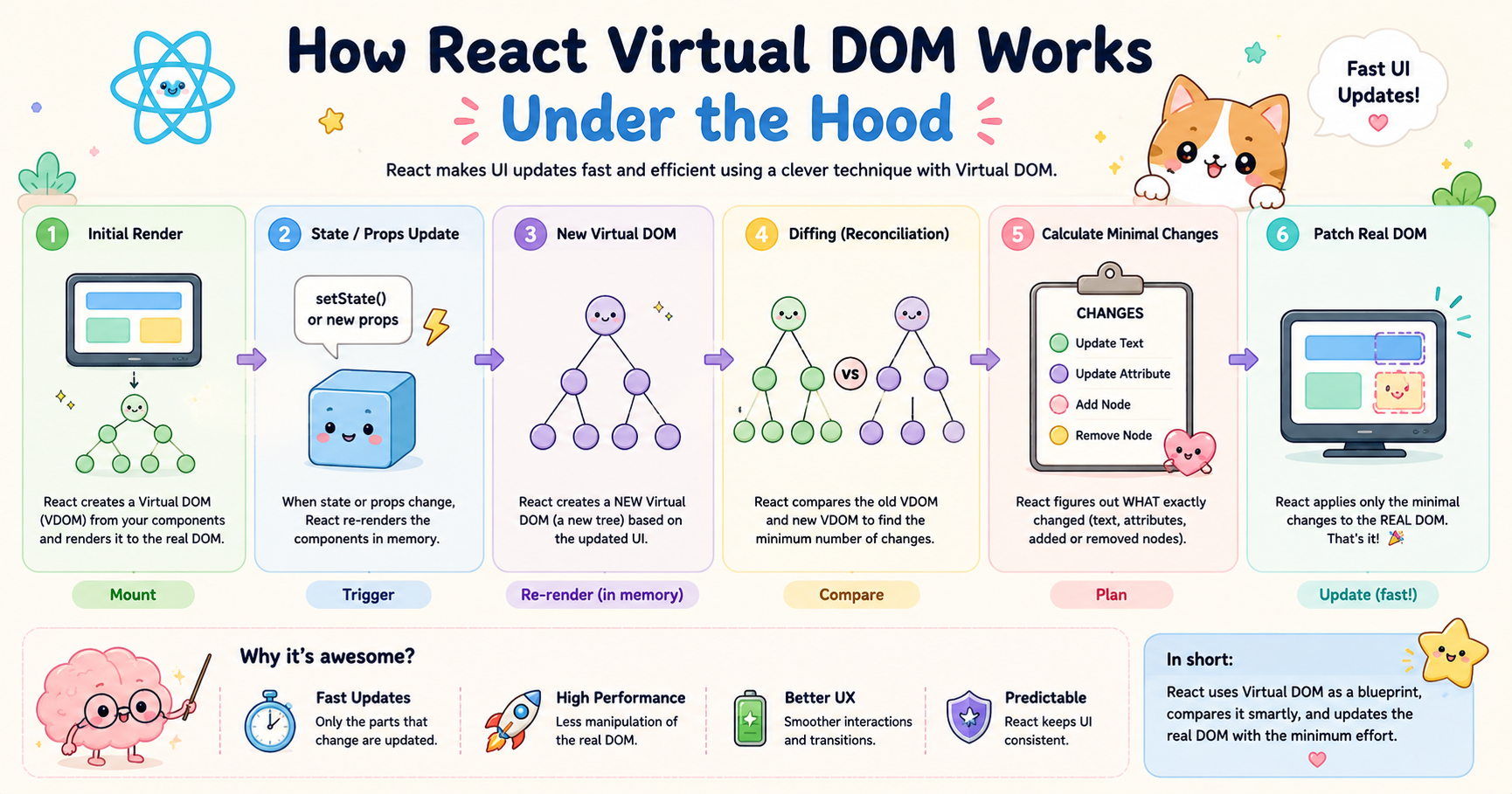
Modern web applications constantly update the user interface. A chat app receives new messages, a dashboard refreshes statistics, and an e-commerce site updates cart totals instantly. Directly manipulating the browser’s DOM for every small change becomes expensive as applications grow larger. React solves this problem using the Virtual DOM.
Understanding how the Virtual DOM works is important because it explains why React applications can remain fast and manageable even when the UI changes frequently.
The Problem the Virtual DOM Solves
The browser’s Real DOM is not designed for high-frequency updates. Every time JavaScript modifies the DOM, the browser may need to:
Recalculate styles
Recompute layout
Repaint elements
Re-render parts of the page
These operations are computationally expensive.
For example, imagine a list containing 1,000 items. If only one item changes but the application updates the entire DOM tree, performance suffers unnecessarily. Frequent direct DOM manipulations can make applications slow and difficult to optimize manually.
Before frameworks like React, developers often had to manually track:
Which element changed
Which DOM node should update
Which parts should remain untouched
This becomes error-prone in large applications. React introduced the Virtual DOM to automate this efficiently.
Real DOM vs Virtual DOM
Real DOM
The Real DOM is the actual browser structure rendered on the screen.
Example:
<div>
  <h1>Hello</h1>
</div>
This structure exists inside the browser memory and directly affects what users see.
Characteristics of the Real DOM:
Directly tied to rendering
Updates are expensive
Large changes can trigger layout recalculations
Manipulating many nodes frequently reduces performance
Virtual DOM
The Virtual DOM is a lightweight JavaScript representation of the Real DOM. Instead of changing the browser DOM immediately, React first creates and updates this virtual representation.
Example representation:
{
  type: "div",
  props: {
    children: [
      {
        type: "h1",
        props: {
          children: "Hello"
        }
      }
    ]
  }
}
Characteristics of the Virtual DOM:
Stored in JavaScript memory
Faster to create and compare
Does not directly affect rendering
Allows React to calculate minimal updates before touching the Real DOM
React minimizes expensive Real DOM operations by first working with cheap JavaScript objects.
Initial Render Process in React
When a React application starts, React performs an initial render.
Suppose we have:
function App() {
  return <h1>Hello React</h1>;
}
Step 1: JSX Conversion
React converts JSX into JavaScript objects.
React.createElement("h1", null, "Hello React");
Internally this becomes a Virtual DOM node.
Step 2: Build Virtual DOM Tree
React creates a complete Virtual DOM tree representing the UI structure.
Example:
App
 └── h1
      └── "Hello React"
Step 3: Create Real DOM Nodes
React converts this Virtual DOM structure into actual browser DOM nodes.
The browser finally renders:
<h1>Hello React</h1>
This is called the mounting phase.
How State or Props Changes Trigger Re-render
React components re-render whenever:
State changes
Props change
Parent components re-render
Example:
function Counter() {
  const [count, setCount] = useState(0);

  return (
    <button onClick={() => setCount(count + 1)}>
      {count}
    </button>
  );
}
When setCount() runs:
React schedules an update
The component function executes again
A new Virtual DOM tree is created
React compares old vs new trees
Only required DOM updates are applied
React does not directly update the DOM immediately after state changes. It first computes what actually changed.
Creation of a New Virtual DOM Tree
Every render creates a new Virtual DOM representation.
Suppose the initial UI is:
<button>0</button>
After clicking:
<button>1</button>
React creates:
Old Virtual DOM
{
  type: "button",
  children: ["0"]
}
New Virtual DOM
{
  type: "button",
  children: ["1"]
}
Now React compares both trees. This comparison process is called reconciliation.
What Diffing (Reconciliation) Means
Diffing is the process where React compares:
Previous Virtual DOM tree
New Virtual DOM tree
The goal is to identify the smallest possible set of changes needed.
Instead of rebuilding the whole UI, React calculates:
Which nodes changed
Which nodes stayed identical
Which nodes were added or removed
This process is called the reconciliation algorithm.
How React Finds Minimal Required Changes
React uses several optimization assumptions to make diffing efficient.
1. Different Element Types Mean Full Replacement
If:
<div>Hello</div>
changes to:
<section>Hello</section>
React destroys the old subtree and creates a new one because the element types differ.
2. Same Element Types Reuse Existing Nodes
If:
<button className="red">Click</button>
changes to:
<button className="blue">Click</button>
React keeps the same <button> node and updates only the class.
3. Keys Help Track List Items
Example:
items.map(item => (
  <li key={item.id}>{item.name}</li>
))
Keys help React identify which list items changed, moved, or stayed the same. Without keys, React may unnecessarily re-render multiple elements.
Updating Only Changed Nodes in the Real DOM
After diffing finishes, React applies only the necessary changes to the Real DOM.
Example:
Initial UI:
<ul>
  <li>A</li>
  <li>B</li>
</ul>
Updated UI:
<ul>
  <li>A</li>
  <li>C</li>
</ul>
React updates only:
<li>B</li>
to:
<li>C</li>
The rest of the DOM remains untouched. This selective updating is the major performance advantage.
Why This Approach Improves Performance
The Virtual DOM improves performance mainly because:
Reduced DOM Manipulation
DOM operations are slower than JavaScript object operations. React performs comparisons in memory first, reducing direct browser work.
Batched Updates
React groups multiple updates together instead of updating immediately after every state change. This avoids unnecessary rendering cycles.
Efficient Rendering
Only modified elements update, which reduces:
Layout recalculations
Paint operations
Browser rendering overhead
Predictable UI Management
Developers no longer manually synchronize the UI with application state. React handles update optimization automatically.
High-Level React Render → Diff → Commit Flow
React internally follows a structured pipeline.
1. Render Phase
React executes component functions and creates a new Virtual DOM tree.
Example:
<App />
This becomes a fresh Virtual DOM structure. This phase is purely computational. No browser updates happen yet.
2. Diff Phase (Reconciliation)
React compares:
Previous tree
New tree
It calculates minimal required updates.
3. Commit Phase
React finally updates the Real DOM. Only computed changes are applied. The browser then repaints affected areas.
Conclusion
React’s Virtual DOM is essentially an optimization layer between application logic and the browser DOM.
This render → diff → commit workflow allows React applications to remain efficient, scalable, and easier to maintain.
The Virtual DOM does not eliminate rendering costs entirely, but it dramatically reduces unnecessary work. That balance between developer simplicity and rendering efficiency is one of the main reasons React became widely adopted for modern frontend development.


