

Error Handling in JavaScript: Try, Catch, Finally
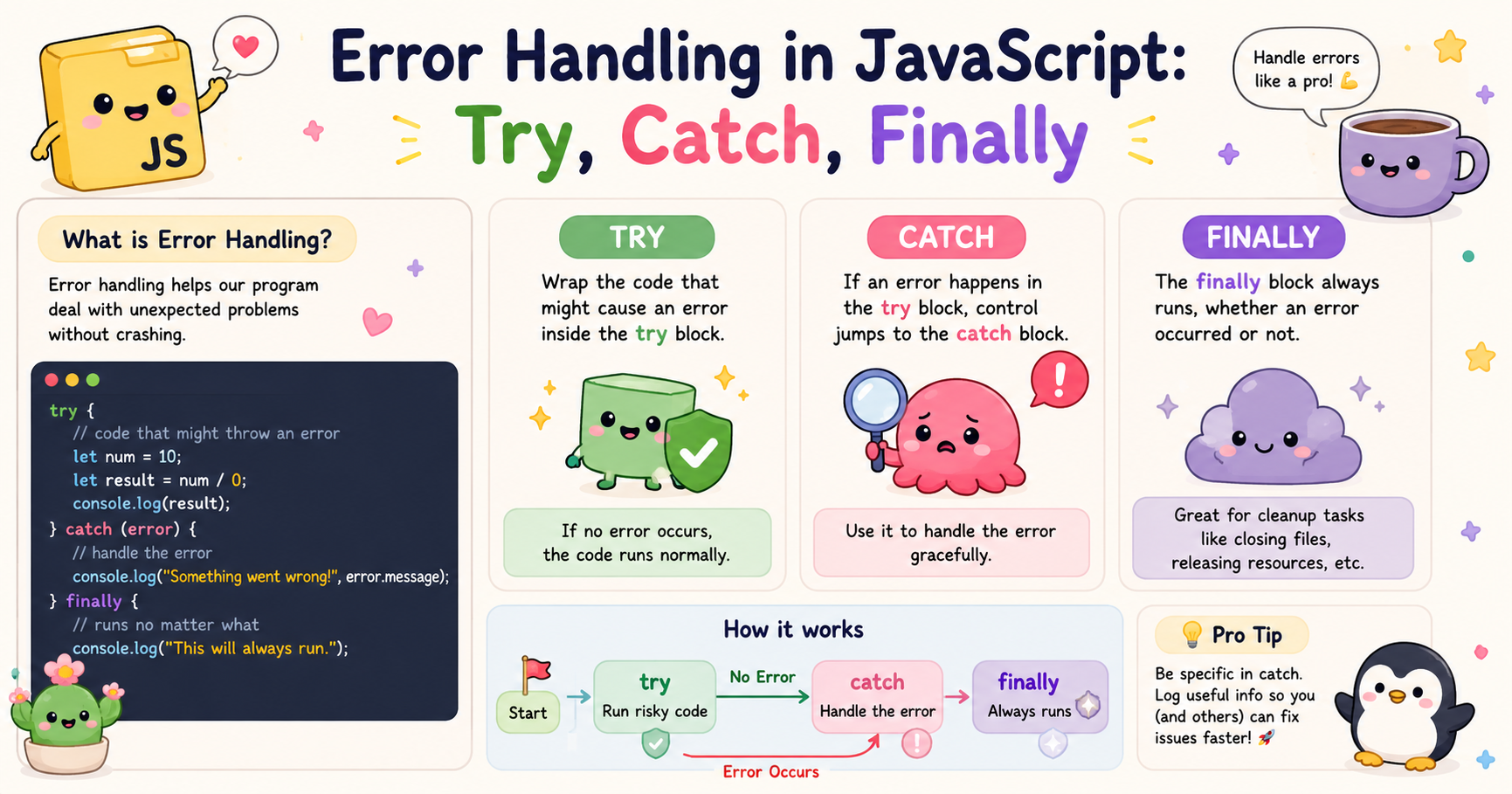
JavaScript is designed to run code dynamically and interact with users, APIs, browsers, and servers in real time. Because of this flexibility, things can go wrong during execution. A variable may not exist, an API may fail, or invalid data may be passed into a function. These problems are called errors.
If errors are not handled properly, JavaScript programs can crash unexpectedly or behave in unpredictable ways. Error handling allows developers to detect problems, respond to them safely, and keep applications stable. JavaScript provides built-in tools like try, catch, finally, and throw to manage these situations.
Understanding error handling is important because modern applications depend heavily on asynchronous operations, user input, and external services where failures are common.
What Errors Are in JavaScript
An error in JavaScript is an issue that interrupts the normal flow of execution. When JavaScript encounters something invalid or impossible to execute, it throws an error.
Here is a simple example:
console.log(userName);
If userName has not been defined anywhere, JavaScript throws a ReferenceError.
Errors usually fall into different categories:
1. Syntax Errors
These occur when the code itself is written incorrectly.
if (true {
  console.log("Hello");
}
The missing closing parenthesis causes a syntax error.
2. Reference Errors
These happen when trying to use variables that do not exist.
console.log(age);
3. Type Errors
These occur when a value is used in an invalid way.
let number = 10;
number.toUpperCase();
Numbers do not have a toUpperCase() method, so JavaScript throws a TypeError.
4. Range Errors
These happen when a value is outside the allowed range.
let arr = new Array(-5);
Errors are normal in programming. The important part is handling them correctly instead of allowing the application to fail completely.
Using try and catch Blocks
JavaScript provides the try and catch structure to safely handle errors.
The syntax looks like this:
try {
  // code that may produce an error
} catch (error) {
  // code to handle the error
}
The try block contains code that might fail. If an error occurs, JavaScript immediately stops executing the try block and jumps to the catch block.
Example:
try {
  let result = 10 / value;
  console.log(result);
} catch (error) {
  console.log("Something went wrong");
}
If value is undefined, the error is caught instead of crashing the program.
Why try-catch Is Useful
Without error handling:
console.log("Start");

undefinedFunction();

console.log("End");
The program stops immediately when the error occurs.
With try-catch:
console.log("Start");

try {
  undefinedFunction();
} catch (error) {
  console.log("Error handled");
}

console.log("End");
Now the application continues running even after the error.
Output:
Start
Error handled
End
This is extremely important in real applications where a single error should not break the entire system.
The finally Block
JavaScript also provides a finally block. The finally block always executes whether an error occurs or not.
Syntax:
try {
  // risky code
} catch (error) {
  // handle error
} finally {
  // always runs
}
Example:
try {
  console.log("Trying...");
} catch (error) {
  console.log("Error");
} finally {
  console.log("Finished");
}
Output:
Trying...
Finished
Why finally Matters
The finally block is useful for cleanup operations.
Examples include:
Closing database connections
Stopping loading animations
Releasing resources
Resetting variables
Hiding loaders after API calls
Example:
function fetchData() {
  console.log("Loading started");

  try {
    let data = JSON.parse('invalid json');
  } catch (error) {
    console.log("Invalid JSON");
  } finally {
    console.log("Loading finished");
  }
}

fetchData();
Even though parsing fails, the cleanup code still runs. This makes applications more reliable and predictable.
Throwing Custom Errors
JavaScript allows developers to create their own errors using the throw keyword. This is useful when built-in errors are not enough to describe a problem.
Basic syntax:
throw "Something went wrong";
However, throwing plain strings is not recommended. It is better to use the Error object.
Example:
throw new Error("Invalid input");
Creating Validation Rules
Custom errors are commonly used for validating user input.
Example:
function divide(a, b) {
  if (b === 0) {
    throw new Error("Division by zero is not allowed");
  }

  return a / b;
}

try {
  console.log(divide(10, 0));
} catch (error) {
  console.log(error.message);
}
Output:
Division by zero is not allowed
Throwing Different Types of Errors
You can also throw specific built-in error types.
Example:
throw new TypeError("Expected a number");
or:
throw new RangeError("Value out of range");
This improves debugging because the error type clearly explains the issue.
Why Error Handling Matters
Error handling is not just about preventing crashes. It directly affects application stability, user experience, debugging, and security.
1. Prevents Application Failure
Without proper handling, one small issue can stop an entire application. For example, if an API request fails and the error is ignored, the UI may freeze or show broken data.
Error handling allows fallback behavior:
try {
  fetchData();
} catch (error) {
  showDefaultData();
}
2. Improves User Experience
Users should not see raw technical errors.
Bad:
TypeError: Cannot read properties of undefined
Better:
"Unable to load your profile right now."
Good error handling converts technical failures into understandable messages.
3. Makes Debugging Easier
Error messages help developers identify problems faster. Logging errors properly can save hours of debugging time.
Example:
catch (error) {
  console.error(error);
}
In larger applications, error logs are often sent to monitoring systems for tracking production issues.
4. Handles Real-World Failures
Real systems constantly face unreliable conditions:
Slow internet
Server downtime
Invalid user input
Corrupted data
Permission issues
Ignoring these realities leads to fragile applications. Robust software assumes failures will happen and prepares for them.
5. Improves Code Reliability
Applications with structured error handling are easier to maintain and extend. Developers can isolate failure points and define predictable recovery behavior. This becomes especially important in backend systems, payment systems, authentication flows, and APIs.
Conclusion
Errors are an unavoidable part of programming, especially in JavaScript where applications interact with browsers, APIs, servers, and user input continuously. Instead of trying to eliminate all errors completely, developers focus on handling them safely and predictably.
The try and catch blocks allow applications to continue running even when something fails. The finally block ensures cleanup logic always executes, while the throw keyword helps developers create meaningful custom errors for validation and business rules.
Good error handling improves reliability, debugging, maintainability, and user experience. In modern JavaScript development, writing code without proper error handling is considered risky because real-world systems are inherently unpredictable. Understanding these concepts early helps developers build applications that are more stable, resilient, and production-ready.


