

Blocking vs Non-Blocking Code in Node.js
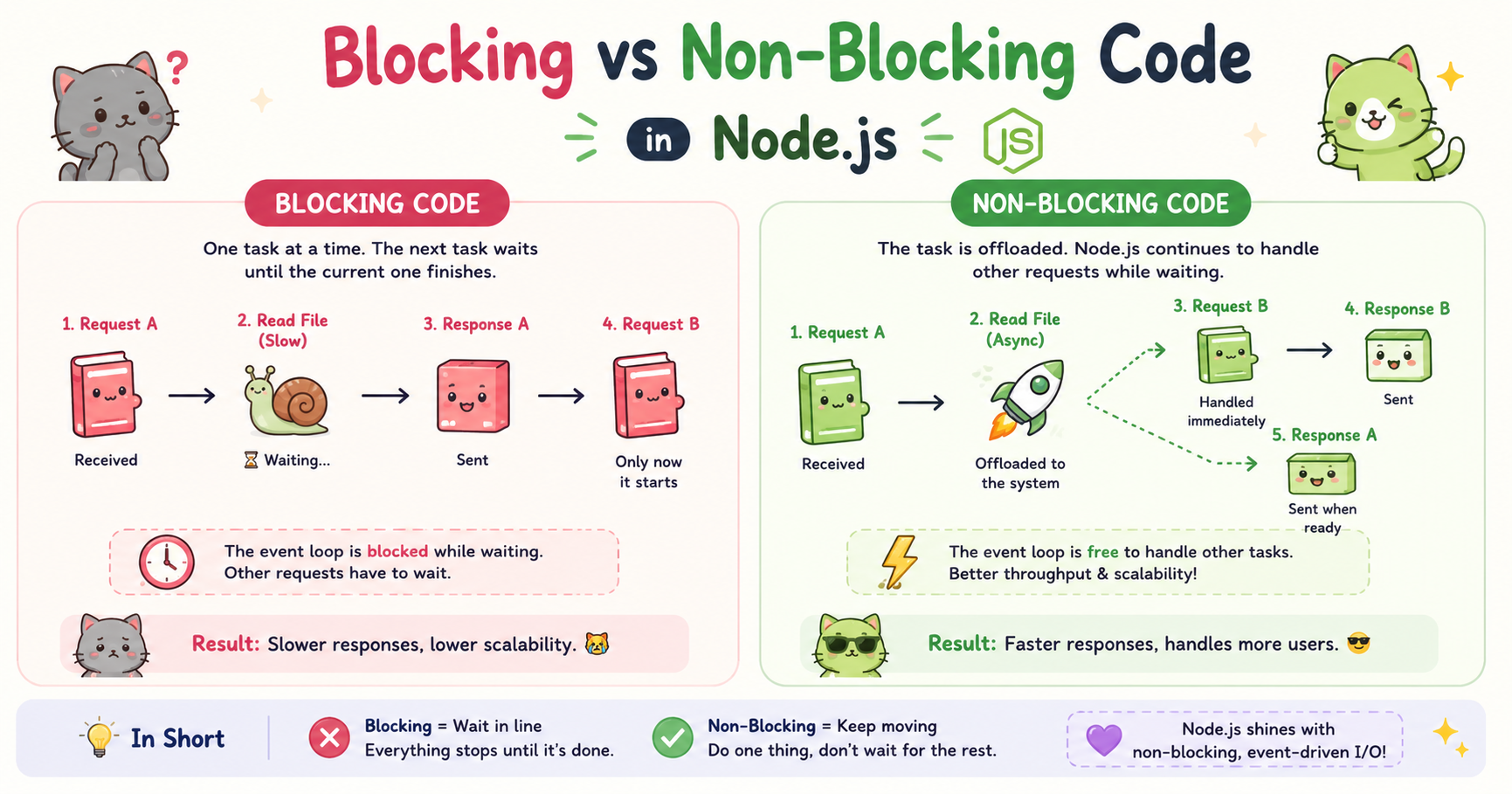
Modern web applications are expected to handle thousands of users simultaneously. Whether it is a chat app, payment gateway, streaming platform, or API server, performance matters. One of the biggest reasons Node.js became popular is its ability to handle many requests efficiently using a non-blocking architecture.
To understand why Node.js performs so well, it is important to understand the difference between blocking and non-blocking code. These concepts directly affect server speed, responsiveness, and scalability.
What Blocking Code Means
Blocking code is code that stops the execution of further operations until the current task is completed. In simple terms, the program “waits” for one task to finish before moving to the next task.
Imagine standing in a single checkout line at a store. If the person in front of you takes ten minutes, everyone behind must wait. Blocking code works similarly.
Example of Blocking Behavior
Suppose a Node.js server reads a large file using a synchronous method:
const fs = require("fs");

const data = fs.readFileSync("largeFile.txt", "utf8");

console.log(data);

console.log("Finished");
Here is what happens:
Node.js starts reading the file.
Execution pauses completely.
Nothing else can run until the file reading finishes.
After completion, the next line executes.
The readFileSync() method is blocking because it halts the execution flow.
Why Blocking Code Is a Problem
Blocking operations become dangerous in servers because a server must handle many users at the same time. If one request performs a heavy blocking task, other incoming requests may get delayed.
For example:
A large file read
Complex calculations
Slow database queries
External API calls
All these tasks can freeze the application temporarily if written using blocking methods.
Server Slowdown Scenario
Imagine a food delivery application where one user uploads a huge image file.
If the server processes that upload using blocking code:
Other users may experience delays
API responses become slower
The server appears unresponsive
This creates poor scalability. Node.js is designed specifically to avoid this issue.
What Non-Blocking Code Means
Non-blocking code allows the program to continue executing other tasks while a long-running operation happens in the background. Instead of waiting, Node.js registers the task and moves forward.
When the operation finishes, Node.js processes the result later using callbacks, promises, or async/await. This is the foundation of Node.js performance.
Example of Non-Blocking Code
const fs = require("fs");

fs.readFile("largeFile.txt", "utf8", (err, data) => {
    if (err) {
        console.log(err);
        return;
    }

    console.log(data);
});

console.log("Finished");
Notice the difference:
Node.js starts reading the file
It does not stop execution
"Finished"prints immediatelyThe file content appears later when reading completes
The application remains responsive during the operation.
Why Non-Blocking Code Makes Node.js Fast
Node.js uses an event-driven architecture combined with a single-threaded event loop. Instead of creating a separate thread for every request, Node.js handles operations asynchronously whenever possible.
This means:
One operation can run in the background
The main thread remains free
More requests can be accepted
Resources are used efficiently
This is especially useful for I/O-heavy applications.
I/O Operations Include
File system access
Database communication
Network requests
API calls
Reading streams
Writing files
These operations are often slow because they depend on external systems. Non-blocking execution prevents the server from sitting idle while waiting.
Async Operations in Node.js
Most Node.js APIs are asynchronous by default.
Node.js provides several ways to work with async operations:
Callbacks
Promises
Async/Await
Using Callbacks
fs.readFile("data.txt", "utf8", (err, data) => {
    console.log(data);
});
The callback runs after the operation completes.
Using Promises
const fs = require("fs").promises;

fs.readFile("data.txt", "utf8")
    .then(data => {
        console.log(data);
    })
    .catch(err => {
        console.log(err);
    });
Promises make async code cleaner and easier to manage.
Using Async/Await
const fs = require("fs").promises;

async function readData() {
    try {
        const data = await fs.readFile("data.txt", "utf8");
        console.log(data);
    } catch (err) {
        console.log(err);
    }
}

readData();
Async/await provides a more readable syntax while still remaining non-blocking internally.
Real-World Example: File Reading
Consider a website that allows users to download reports.
Blocking Approach
const report = fs.readFileSync("report.pdf");
Problems:
Server pauses while reading
Other users wait
Large files cause delays
Non-Blocking Approach
fs.readFile("report.pdf", (err, data) => {
    // send file
});
Benefits:
Multiple users can access the server simultaneously
Better responsiveness
Improved scalability
Real-World Example: Database Calls
Database operations are naturally slow because they involve network communication.
Blocking Style
Imagine waiting for a database response before handling anything else. This would severely limit the server’s ability to process concurrent users.
Non-Blocking Style
db.users.find({}, (err, users) => {
    console.log(users);
});
While the database processes the query:
Node.js handles other incoming requests
APIs remain responsive
Server throughput improves
This is why Node.js is commonly used for:
Real-time applications
Chat systems
Streaming platforms
REST APIs
Microservices
Conclusion
Blocking and non-blocking behavior is one of the most important concepts in Node.js. Blocking code pauses execution and can reduce server performance significantly when many users are connected.
Non-blocking code allows Node.js to continue processing other operations while waiting for slow tasks like file reads or database responses. This asynchronous model is one of the primary reasons Node.js became widely adopted for scalable backend development.
By avoiding unnecessary blocking operations and using asynchronous APIs properly, developers can build faster, more responsive, and highly scalable applications. Understanding this difference is essential for writing efficient Node.js applications in real-world production environments.


