

Async/Await in JavaScript: Writing Cleaner Asynchronous Code
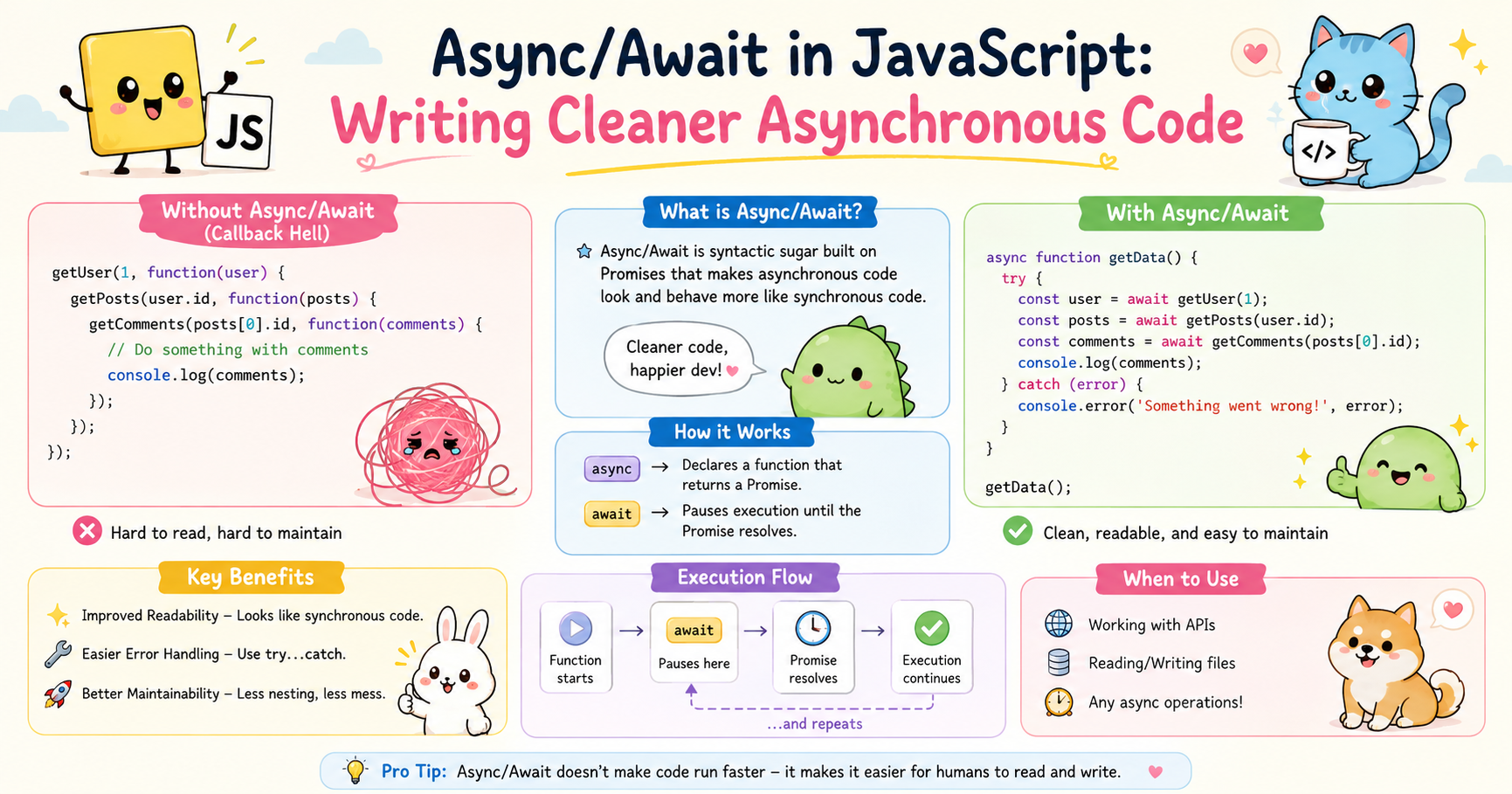
JavaScript is single-threaded by nature, but modern applications constantly perform tasks that take time. Fetching data from APIs, reading files, connecting to databases, or waiting for user actions are all asynchronous operations. Without asynchronous programming, the browser would freeze every time a task took longer than expected.
For years, JavaScript developers relied on callbacks and later promises to handle asynchronous operations. While promises improved readability significantly, large promise chains still became difficult to manage in complex applications. To solve this problem, JavaScript introduced async and await.
Async/await provides a cleaner and more readable way to write asynchronous code while still using promises behind the scenes.
Why Async/Await Was Introduced
Before async/await, asynchronous programming in JavaScript was commonly handled using callbacks.
Example using callbacks:
getUser(function(user) {
  getOrders(user.id, function(orders) {
    getPayment(orders[0], function(payment) {
      console.log(payment);
    });
  });
});
This style quickly became difficult to read and maintain. Deeply nested callbacks created what developers often called “callback hell.”
Promises improved the situation:
getUser()
  .then(user => getOrders(user.id))
  .then(orders => getPayment(orders[0]))
  .then(payment => console.log(payment))
  .catch(error => console.log(error));
This was cleaner, but long promise chains could still become confusing in larger applications.
Async/await was introduced to make asynchronous code look and behave more like synchronous code. The goal was readability, maintainability, and easier error handling.
With async/await:
async function processPayment() {
  try {
    const user = await getUser();
    const orders = await getOrders(user.id);
    const payment = await getPayment(orders[0]);

    console.log(payment);
  } catch (error) {
    console.log(error);
  }
}
The flow becomes easier to understand because the code reads from top to bottom in a natural sequence.
How Async Functions Work
An async function is declared using the async keyword.
Basic syntax:
async function greet() {
  return "Hello";
}
Even though the function returns a string, JavaScript automatically wraps the return value inside a promise.
Equivalent behavior:
function greet() {
  return Promise.resolve("Hello");
}
Calling the async function returns a promise:
greet().then(message => {
  console.log(message);
});
Output:
Hello
Async functions allow the use of the await keyword inside them. Without the async keyword, await cannot be used.
Example:
async function fetchData() {
  return "Data loaded";
}
The main idea is:
asyncmakes a function return a promiseawaitpauses execution until the promise resolves
This combination creates code that looks synchronous while remaining asynchronous internally.
Await Keyword Concept
The await keyword is the core feature of async/await.
Example:
function delay() {
  return new Promise(resolve => {
    setTimeout(() => {
      resolve("Finished");
    }, 2000);
  });
}

async function run() {
  const result = await delay();

  console.log(result);
}

run();
Output after 2 seconds:
Finished
Here’s what happens internally:
delay()returns a promiseawaitpauses the function executionJavaScript continues handling other tasks
Once the promise resolves, execution resumes
This is important because await does not block the entire JavaScript engine. It only pauses the current async function.
Without await, the code would look like this:
delay().then(result => {
  console.log(result);
});
Both approaches work, but async/await is generally easier to read.
Multiple Await Operations
Async/await becomes especially useful when handling sequential asynchronous operations.
Example:
function fetchUser() {
  return Promise.resolve({ id: 1, name: "Pritam" });
}

function fetchPosts(userId) {
  return Promise.resolve(["Post 1", "Post 2"]);
}

async function displayPosts() {
  const user = await fetchUser();

  const posts = await fetchPosts(user.id);

  console.log(user.name);
  console.log(posts);
}

displayPosts();
Output:
Pritam
["Post 1", "Post 2"]
The code looks almost identical to synchronous programming, which improves clarity significantly.
Error Handling with Async Code
Handling errors is one of the strongest advantages of async/await.
With promises, errors are usually handled using .catch():
fetchData()
  .then(data => console.log(data))
  .catch(error => console.log(error));
With async/await, standard try...catch blocks can be used.
Example:
function getData() {
  return new Promise((resolve, reject) => {
    reject("Something went wrong");
  });
}

async function loadData() {
  try {
    const data = await getData();

    console.log(data);
  } catch (error) {
    console.log(error);
  }
}

loadData();
Output:
Something went wrong
This approach feels more natural because it resembles traditional synchronous error handling.
Why This Matters
In real-world applications, asynchronous operations frequently fail because of:
Network issues
API failures
Invalid responses
Database problems
Timeout errors
Using try...catch makes it easier to manage these situations cleanly.
Comparison with Promises
Async/await is built on top of promises. It does not replace promises internally. Instead, it provides cleaner syntax for working with them.
Promise-Based Approach
function fetchUser() {
  return Promise.resolve("User data");
}

fetchUser()
  .then(data => {
    console.log(data);
  })
  .catch(error => {
    console.log(error);
  });
Async/Await Approach
async function getUser() {
  try {
    const data = await fetchUser();

    console.log(data);
  } catch (error) {
    console.log(error);
  }
}

getUser();
Both produce the same result, but async/await generally improves readability.
Differences Between Promises and Async/Await
| Feature | Promises | Async/Await |
|---|---|---|
| Syntax Style | Chain-based | Sequential |
| Readability | Moderate | High |
| Error Handling | .catch() |
try...catch |
| Debugging | Harder in long chains | Easier |
| Learning Curve | Slightly higher | More intuitive |
Conclusion
Async/await transformed asynchronous programming in JavaScript by making code easier to read, write, and maintain. Instead of deeply nested callbacks or long promise chains, developers can now structure asynchronous logic in a clean sequential format.
The async keyword allows functions to return promises automatically, while await pauses execution until promises resolve. Combined with try...catch, async/await also simplifies error handling considerably.
Although promises still power async/await internally, the newer syntax reduces complexity and improves code clarity in real-world applications. For modern JavaScript development, understanding async/await is essential because it has become the dominant approach for handling asynchronous operations efficiently.


